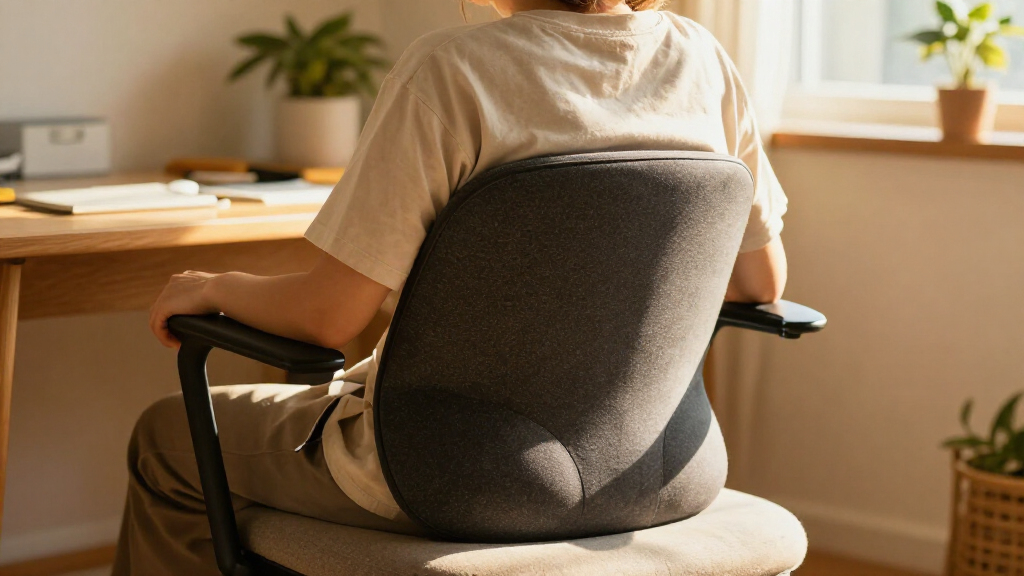

Use this guide to set up a heated lumbar support cushion on a chair, adjust it to support your lower back, and operate its heat controls safely. It is for anyone using a cushion at home, at a desk, or in a vehicle. The task takes about 10-15 minutes and requires no special experience.

Get comfort and recovery gear delivered free with Prime
- Fast, free delivery on millions of items
- Prime Video, Amazon Music and more included
- Member-only deals all year

CILI Heated Lumbar Support Pillow with Vibration Massage
- ✔ Brand / model: CILI CL-1307
- ✔ Fill: Memory foam
- ✔ Dimensions: 5.1 × 17.7 × 16.9 in

CILI Heated Lumbar Support Pillow with Vibration Massage
- ✔ Brand / model: CILI CL-4102
- ✔ Materials: Foam fill; cotton fabric and black short plush
- ✔ Dimensions: 14.2 × 3.9 × 13.6 in

Drive Medical Comfort Touch Heated Lumbar Support Cushion
- ✔ Brand: Drive Medical
- ✔ Model: Comfort Touch
- ✔ Color: Gray
Difficulty: Beginner | Time: 10-15 minutes
What You’ll Need
Tools & Materials:
- Heated lumbar support cushion
- Power adapter, USB cable, or vehicle power connector supplied or approved for the cushion
- Chair with a stable backrest
- Product manual and care label
Knowledge:
- Basic familiarity with plugging in a device and using buttons or switches
- Ability to sit and check whether the cushion feels comfortable
Read the cushion’s manual and care label before connecting power. Models differ: some use a wall adapter, USB power bank, or vehicle socket, and their heat settings and automatic shutoff times vary. Use only the power source and accessories specified by the manufacturer. If you have reduced skin sensation, trouble noticing heat, or a condition affected by warmth, ask a healthcare professional before use.
CILI Heated Lumbar Support Pillow with Vibration Massage
The CILI CL-1307 is the most configurable cushion in this group, making it our best overall choice for shoppers who want both lumbar support and adjustable warmth. Its high-density memory foam and ergonomic shape give it a more clearly defined support proposition than the Drive Medical model, whose supplied details emphasize postural support without naming its fill. Three heat settings, listed from 102°F to 140°F, also offer more choice than the CL-4102’s two levels.Vibration is an add-on, not a substitute for hands-on massage. The CL-1307 has two motors, three vibration levels, and three modes, and the heat and vibration can be used separately. That gives us more ways to tailor the session than the Drive cushion, which lists heat therapy but no vibration. However, the CILI cushions both rely on vibration rather than kneading or shiatsu, so buyers seeking a rolling or deep-tissue sensation should look elsewhere.Its adjustable straps, washable cover, and 30-, 60-, or 90-minute timer make it a versatile chair companion. Compared with the more compact CL-4102, this model weighs 2.7 pounds and has a larger stated footprint, so moving it around is less appealing. Heat also warms gradually, and it needs a power source. Choose it for support and control; skip it if you prioritize quick warmth, cordless use, or mechanical massage.
Pros:
- Memory foam and an ergonomic shape are designed to support the lower back.
- Three heat settings and separate heat and vibration use allow more adjustment than the other picks.
- Three vibration modes and levels broaden the comfort options.
- Adjustable straps and a removable washable cover support regular chair use.
Cons:
- Vibration does not provide kneading or shiatsu massage.
- Heat warms gradually and the cushion requires a power source.
- At 2.7 pounds, it is heavier than the CL-4102.
Best for: People who want memory foam lumbar support, several heat levels, and vibration controls for a dedicated chair.
Not ideal for: Shoppers seeking cordless use, fast heat, kneading massage, or a very lightweight cushion to carry between seats.
Bottom line: Choose the CL-1307 for the lineup’s broadest combination of stated lumbar support, heat adjustment, and vibration control.
“Choose the CL-1307 for the lineup’s broadest combination of stated lumbar support, heat adjustment, and vibration control.”
CILI Heated Lumbar Support Pillow with Vibration Massage
Where the CL-1307 is the more adjustable option, the CILI CL-4102 is the practical pick for a cushion that may travel from an office chair to a sofa, bed, or car seat. Its stated weight is 0.77 kg, and its dimensions are more compact than the CL-1307’s, making repositioning less of a chore. Adjustable straps help keep it in place across different seating types, a useful distinction from the Drive Medical cushion, whose supplied details do not specify straps.The CL-4102 still combines back support with heat and two-motor vibration, but its controls are simpler. It has two heat levels and three vibration modes, compared with the CL-1307’s three heat levels and three vibration levels. The heating description says it reaches 125°F in about 10 minutes, which gives buyers a clearer expectation than the CL-1307’s gradual-warming note. That is a specification, not a promise that warmth will feel equally quick in every setting.Its timers split the difference between convenience and extended use: heating can be set for one, two, or four hours, but vibration stops after 15 minutes. Compared with the CL-1307, that shorter vibration window may interrupt a longer session; compared with Drive Medical, it adds a massage feature Drive does not list. It remains a vibration-only cushion and needs power, so frequent travelers without outlet access should skip it.
Pros:
- Lighter and more compact than the CL-1307 for moving between seats.
- Adjustable straps support use on a range of seat types.
- Two heat settings and three vibration modes combine support with warmth and vibration.
- Separate heating and vibration timers include a long heating option.
Cons:
- Vibration automatically stops after 15 minutes.
- Only two heat levels are listed, compared with three on the CL-1307.
- Vibration only; it does not provide kneading or shiatsu massage.
Best for: People who want a lighter, strapped lumbar cushion they can reposition among home, office, and vehicle seats with power nearby.
Not ideal for: Buyers who want multiple vibration intensities, an extended vibration session, cordless use, or kneading massage.
Bottom line: Pick the CL-4102 when seat-to-seat flexibility matters more than the CL-1307’s broader heat and vibration adjustment.
“Pick the CL-4102 when seat-to-seat flexibility matters more than the CL-1307’s broader heat and vibration adjustment.”
Drive Medical Comfort Touch Heated Lumbar Support Cushion
The Drive Medical Comfort Touch is the straightforward choice for buyers who want a heated lumbar cushion without vibration controls. Its stated strengths are ergonomic postural support, heat therapy, and a removable velour cover. Compared with either CILI model, it avoids the extra vibration feature and its associated settings, which can make the choice easier for someone who simply wants warmth while seated.That simplicity comes with less information and fewer stated adjustments. The product details do not specify heat levels, a timer, cushion dimensions, or straps. By comparison, the CL-1307 gives buyers three temperature settings and adjustable chair attachment, while the CL-4102 lists two heat levels, timers, and several recommended seat types. We therefore see Drive Medical as a focused support option rather than the most adaptable pick in the lineup.The velour cover is removable for cleaning, but the cushion still needs access to a power supply. It may suit a fixed chair or recliner better than a multi-seat routine where straps and portability matter. Since no temperature range or control scheme is provided here, buyers who need precise heat selection should favor one of the CILI cushions. Choose Drive Medical when simple heat and a soft cover matter more than vibration or detailed customization.
Pros:
- Combines heat therapy with an ergonomic postural support design.
- Soft velour cover is removable for cleaning.
- Simpler feature set than the two CILI vibration cushions.
Cons:
- Requires access to a power supply.
- The supplied details do not specify heat settings, timer, dimensions, or weight.
- No vibration feature is listed.
Best for: People who want heated postural support for a regular seat and do not need vibration or multiple listed modes.
Not ideal for: Shoppers who need adjustable straps, specified heat levels, vibration, or detailed timer options.
Bottom line: Choose Drive Medical for a simpler heat-and-support setup, while accepting fewer stated controls than either CILI option.
“Choose Drive Medical for a simpler heat-and-support setup, while accepting fewer stated controls than either CILI option.”
As an Amazon Associate we earn from qualifying purchases.
Before You Start
Inspect the cushion, cable, connector, and power adapter for cuts, exposed wires, loose parts, or other damage. Do not plug in a damaged unit. Keep the cushion and its electrical connections dry, and do not use it while wet. Do not fold, bunch, or cover it in a way the manual prohibits; trapped heat may make the surface uncomfortably hot. For a vehicle, set up the cushion while parked and follow the vehicle and cushion instructions for power use.
Step-by-Step Instructions
Step 1: Choose a suitable chair
Place the cushion on a firm, stable chair with a backrest. Move away loose objects that could press against its heating area or interfere with the cable. Check that the chair lets you sit with both feet supported and your back near the backrest.
Tip: Avoid unstable chairs or seating that forces you to lean or twist to reach the controls.
Check: The chair stays steady when you sit, and the cushion can rest flat against its back.
Step 2: Connect the approved power source
Locate the cushion’s power connector and check the manual for its required adapter or power source. Connect the cable securely without forcing the plug. Route the cable so it does not cross a walking path, become pinched by the chair, or pull tight when you sit or stand.
Tip: If the cushion is designed for a vehicle socket or a USB power bank, do not substitute a wall adapter unless the manufacturer allows it.
Check: The connector is seated, the cable is undamaged and unobstructed, and the controls respond as described in the manual.
Step 3: Position the cushion at your lower back
Set the cushion against the chair back with its lumbar support area roughly level with the inward curve of your lower back, above your pelvis. Sit down and shift the cushion up or down until it fills that curve without pushing your shoulders forward. Secure straps only as directed by the manual.
Tip: The cushion should feel supportive, not like a hard object forcing your spine into a fixed position.
Check: Your lower back rests against the cushion comfortably, and you can sit without straining or leaning away.
Step 4: Settle into a neutral sitting position
Sit back with your hips supported, shoulders relaxed, and feet resting on the floor or a footrest. Adjust the chair or cushion if you feel pressure at your waist, ribs, or tailbone. Keep the heating surface against clothing or the body only as the product instructions permit.
Tip: Change position if the cushion makes you arch excessively or slump forward.
Check: You can sit comfortably with your back supported and no sharp, pinching, or concentrated pressure.
Step 5: Start with the lowest heat setting
Turn the cushion on using its control, then select the lowest heat setting. Allow it to warm for the time stated in the manual. Check how it feels against your back and increase the setting only if you want more warmth and the instructions allow it.
Tip: Do not judge the temperature by touching only the control or outer cover; check the area against your back and stop if it feels too hot.
Check: The cushion warms as expected, and the heat feels comfortable rather than hot or irritating.
Step 6: Use heat for a limited period
Follow the manual’s recommended session length and any automatic shutoff guidance. Stay attentive to how your skin feels, especially during the first use, and switch the heat off if you feel burning, discomfort, or unusual redness. Do not sleep on or leave a powered cushion unattended unless the manufacturer explicitly says that use is safe.
Tip: An automatic shutoff is a backup feature, not a reason to exceed the stated usage instructions.
Check: You remain comfortable throughout the session, with no burning sensation or skin irritation.
Step 7: Turn off, unplug, and store the cushion
Switch the heat off after use. Disconnect the power source by holding the plug or connector, not pulling the cable. Let the cushion cool, then store it in a dry place without sharp bends or heavy objects pressing on it. Follow the care label before cleaning.
Tip: Do not wash or immerse a heated cushion unless the manual specifically explains how to do so safely.
Check: The indicator is off, the cushion has cooled, and the cable and cushion are stored dry and undamaged.
Common Mistakes to Avoid
- Placing the lumbar bulge too high or too low. — Sit down and adjust the support area to the inward curve of your lower back, just above your pelvis. Recheck the fit after changing chairs.
- Starting at the highest heat setting. — Begin at the lowest setting and increase gradually only if it remains comfortable and the manual permits it.
- Using an unapproved adapter or power source. — Match the power source to the product instructions. Do not guess based on a connector that happens to fit.
- Leaving the cushion folded, covered, or pressed against an object while heating. — Keep it arranged as directed, with the heating area unobstructed and no added layers that could trap heat.
Troubleshooting
Problem: The cushion does not heat up.
Solution: Switch it off, check that the connector is fully seated, and confirm that the outlet, vehicle socket, or power bank is working and compatible. Check the manual for indicator lights or reset instructions. Stop using it if the cable or connector looks damaged.
Problem: The heat feels uneven or too strong.
Solution: Turn the heat off and adjust the cushion so it lies flat as directed. Remove any folds or trapped material, then restart at the lowest setting after checking the manual. Stop use if the surface remains uncomfortably hot.
Problem: The cushion slides down the chair.
Solution: Reposition it and attach its straps only to the points described by the manufacturer. If it still slips, try a chair with a more compatible backrest rather than tying or pinning the cushion in place.
Problem: The power cuts out when you move.
Solution: Turn the cushion off and check whether the cable is being pulled, pinched, or caught by the chair. Reroute it with slack and reconnect securely. If power still cuts out, stop use and contact the manufacturer.
What Success Looks Like
The cushion sits flat and stays in place, its lumbar area supports the inward curve of your lower back, and the power cable remains clear of pinch points. The controls operate as described, the lowest heat setting feels comfortable, and you can finish a session without burning, irritation, damaged wiring, or unusual pressure.
Next Steps
Use the cushion according to its manual and check its cover, cable, and connector regularly for wear. Clean it only by the care-label method, with the power disconnected. If it causes persistent discomfort or skin changes, stop using it and seek appropriate medical advice. Replace or repair a damaged cushion only through a manufacturer-approved service route.
Frequently Asked Questions
How high should a heated lumbar cushion sit?
Place its lumbar support area against the inward curve of your lower back, generally just above your pelvis. Adjust while seated so it supports you without pushing your shoulders forward or creating pressure.
Can I use a heated lumbar cushion in a car?
Use it in a vehicle only if the cushion is designed for that setting and the manual approves the vehicle power source. Set it up while parked, route the cable clear of pedals and controls, and follow the vehicle instructions.
Can I sit on a heated lumbar cushion all day?
Follow the manufacturer’s session guidance and shutoff instructions rather than using heat continuously by default. Take breaks, change position, and turn the heat off if you feel discomfort.
What should I do if my skin feels hot or irritated?
Turn the cushion off and move away from the heated area. Do not resume use while irritation persists. If symptoms continue or you have reduced sensation, seek advice from a healthcare professional.