This checklist is for people looking to make everyday hand and wrist tasks feel more comfortable, whether they spend time at a keyboard, use a mouse, or want tools for hand exercises. It covers a mix of workstation accessories and hand-support items; individual needs and comfort can vary.

Get comfort and recovery gear delivered free with Prime
- Fast, free delivery on millions of items
- Prime Video, Amazon Music and more included
- Member-only deals all year
The sections follow the six picks in order: keyboard, mouse, wrist support, finger splint, therapy putty, and compression gloves. Each section explains what the item is intended to help with, what to check before choosing it, and who may find it a better fit.
Use the checklist to compare the product details with your own handedness, fit, and intended use. Check dimensions, sizing guidance, compatibility, and care instructions where provided, and follow any clinician’s advice for a specific condition or recovery plan.
Ergonomic keyboard
A keyboard is a central part of many desk setups, so its shape and placement can affect how your hands and wrists rest while typing. The Microsoft Wired Natural Ergonomic Keyboard 4000 is the pick in this slot. Before choosing it, consider how its layout feels to you and whether it works with the computer and desk arrangement you already use.
A common mistake is assuming that an ergonomic label guarantees a comfortable fit. People differ in hand size, typing habits, and tolerance for unfamiliar layouts. Check the product’s connection requirements and physical dimensions, and make sure you have enough desk space to position it without crowding your mouse or forcing your shoulders and wrists into an awkward reach. If you have not used a shaped keyboard before, account for an adjustment period and consider whether you can return to a familiar keyboard when needed.
Place the keyboard so your elbows can stay comfortably near your sides and your wrists are not pressed against a hard edge while typing. Compare its layout with your usual workflow, including any keys or shortcuts you rely on. Fit and placement matter as much as the product category: stop or adjust if typing brings on discomfort, and seek professional guidance for persistent symptoms.
What to look for:
- Confirm the wired connection works with your computer.
- Check the keyboard’s dimensions against your desk space.
- Review the layout and key arrangement for your typing habits.
- Plan a placement that keeps the mouse within easy reach.
- Consider whether a shaped keyboard feels comfortable for your hands.
Microsoft Wired Natural Ergonomic Keyboard 4000
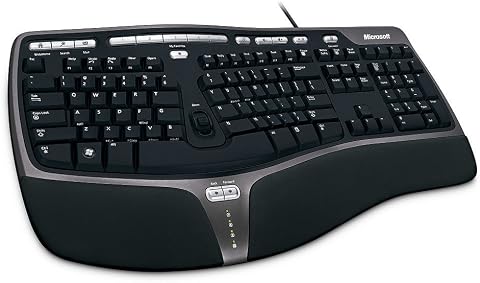
The Microsoft Wired Natural Ergonomic Keyboard 4000 features a split design and curved key layout that encourages natural hand, wrist, and forearm positioning. It includes a cushioned palm rest, media control keys, a Zoom Slider for easy zooming, and five customizable My Favorites keys for quick access to frequently used items.
Pros:
- Split ergonomic design promotes natural hand and wrist positioning.
- Cushioned palm rest supports a neutral wrist angle for comfort.
- Media control keys and Zoom Slider improve productivity.
- Ambidextrous layout with customizable shortcut keys.
Cons:
- Wired connection limits placement flexibility.
- Large footprint may occupy significant desk space.
- No backlighting for low‑light environments.
Best for: People seeking a wired keyboard with an ergonomic shape.
Not ideal for: People who need a wireless keyboard or prefer a familiar standard layout.
Bottom line: Check connection, layout, and desk fit before switching to the Microsoft Wired Natural Ergonomic Keyboard 4000.
Vertical mouse
A mouse is used for repeated, small hand movements, so its shape and reach can matter over a long work session. The Evoluent VerticalMouse 4 Wireless Ergonomic Mouse, Right-Handed is a vertical-style option for right-handed use. Check that handedness matches the hand you intend to use and that the wireless connection suits your computer and workspace.
A frequent buying mistake is choosing a vertical mouse based on the product category alone. Hand size, grip, pointer habits, and the location of buttons all affect whether a particular model feels usable. Review the product dimensions and button layout, and consider whether your hand can rest on it without reaching or gripping tightly. Also check how it connects and what setup or power requirements apply, since “wireless” does not specify compatibility with every device.
Keep the mouse close to the keyboard so you can reach it without extending your arm. Try it in short sessions as you adjust to its orientation, and avoid pressing your wrist against the desk edge. If you switch hands or need a left-handed design, this right-handed pick may not suit you. Let comfort guide use, and get clinical advice if pain or tingling persists rather than relying on a mouse shape to address a medical problem.
What to look for:
- Confirm that right-handed use matches your needs.
- Check compatibility with your computer and wireless connection setup.
- Review the dimensions against your hand size and desk space.
- Inspect button placement for your usual pointer tasks.
- Position it close to the keyboard to limit reaching.
Evoluent VerticalMouse 4 Wireless Ergonomic Mouse, Right-Handed

The Evoluent VerticalMouse 4 is a wireless, right-handed mouse shaped to hold the hand in a more upright position and reduce forearm twisting. It has six customizable buttons, adjustable pointer speed, a thumb rest, and a wide bottom lip for added comfort.
Pros:
- Upright shape is designed to reduce forearm twisting
- Six customizable buttons
- Pointer speed can be adjusted without releasing the mouse
- Wide bottom lip and thumb rest add comfort
Cons:
- Designed for right-handed users
- Advanced button customization requires the included software
Best for: Right-handed users seeking a wireless vertical mouse.
Not ideal for: Left-handed users or anyone who needs a wired mouse.
Bottom line: Match handedness, connection, and hand fit before choosing this Evoluent mouse.
Wrist rest
Wrist rests can provide a surface near a keyboard or mouse, but their placement and height determine whether they help your setup feel comfortable. This slot features the Ergonomic Mouse Pad with Wrist Support and Keyboard Wrist Rest Set, combining support items for two parts of a workstation. Check what pieces are included and whether their dimensions fit your keyboard and mouse area.
A common mistake is resting the wrist on a cushion while actively typing or mousing in a way that keeps it bent or pressed down. A support should not force your hands upward, block movement, or create pressure at the base of the palm. Compare the rest’s height with your keyboard and desk, and consider whether the mouse pad gives enough room for the way you move the mouse. If the pieces cannot be placed together without crowding your workspace, a set may not be the right format.
Use the supports as a place to relax between movements, rather than as a reason to anchor the wrists during repetitive work. Adjust your chair, desk, and keyboard position so your arms can stay comfortable, and take breaks when needed. Height and placement are personal: check the product details and test a neutral, relaxed posture. If pressure or discomfort increases, reposition or stop using the support and seek professional advice for ongoing symptoms.
What to look for:
- Confirm the set includes the keyboard and mouse supports you need.
- Compare rest height with your keyboard and desk.
- Check mouse-pad dimensions against your preferred movement range.
- Make sure both pieces fit without crowding the workstation.
- Look for care instructions that fit your routine.
Ergonomic Mouse Pad with Wrist Support and Keyboard Wrist Rest Set

This ergonomic set includes a mouse pad and keyboard wrist rest crafted with memory foam for long-lasting support and comfort. The design features a 15-degree slope, massage beads, and a silky fabric surface to promote wrist health and precise control during extended use.
Pros:
- Provides ergonomic support to reduce wrist strain
- Comfortable massage bead design promotes blood flow
- Non-slip PU base ensures stability during use
- Easy to clean and maintain
Cons:
- May be too large for small desks
- Memory foam may flatten over time with heavy use
Best for: People looking for keyboard and mouse support pieces together.
Not ideal for: People whose desk cannot accommodate both pieces comfortably.
Bottom line: Check dimensions and height so the set fits your workstation without changing your hand posture.
Finger splint
A finger splint is a fit-sensitive item, and the intended finger, hand, and size should guide selection. The listed pick, Trigger Finger Splint Finger Brace – Right Small-Medium, specifies a right-side fit and a small-medium size. Verify that those details match the intended wearer and finger before ordering, and consult the product’s sizing guidance rather than guessing from glove size.
A common mistake is treating a splint as a one-size solution or assuming that a product name confirms it is appropriate for every finger concern. Check how the brace is meant to sit, how it is secured, and whether the instructions identify a specific finger or use. Fit should feel secure without excessive tightness, pinching, numbness, or changes in skin color. If sizing falls between options or the intended finger is unclear, ask a healthcare professional or the seller for fit guidance before use.
Follow the provided wearing and care instructions, and make sure the splint does not interfere with circulation or cause new discomfort. Do not force a brace onto a finger when the fit seems wrong. The right-side sizing is a defining constraint of this pick, so it may not suit a left hand or a wearer outside its stated size range. For persistent symptoms, injury, or uncertainty about splinting, get individualized medical guidance.
What to look for:
- Confirm the right-side designation matches the intended hand.
- Use the product’s sizing guide to check small-medium fit.
- Verify which finger and use the instructions describe.
- Check fastening and wearing directions before use.
- Stop if the brace causes pressure, numbness, or skin changes.
Trigger Finger Splint Finger Brace – Right Small-Medium

This trigger finger splint provides comfortable support for finger injuries, arthritis, or tendonitis. Made with breathable materials, it helps keep fingers straight, reduces pain, and aids recovery with removable, bendable metal splints for flexibility and support.
Pros:
- Breathable and lightweight for comfortable all-day wear
- Removable, bendable metal splints for customizable support
- Effective in reducing finger pain and aiding recovery
Cons:
- Hand wash only, may require careful maintenance
- Limited to right hand in small-medium size
- May not fit larger or smaller finger sizes
Best for: Someone whose intended hand and size match the listing.
Not ideal for: People needing a left-side brace or a different size.
Bottom line: Confirm hand, finger, and fit guidance before using this splint.
Hand therapy putty
Therapy putty is a hand-exercise tool, so the intended exercises and resistance should guide a kit choice. The pick is the Special Supplies Physical Hand Therapy Putty Kit – 15-Piece Finger Exe. The product name indicates a 15-piece kit, but check the listing for the full contents, putty varieties, and any exercise instructions before deciding whether it matches your needs.
A common mistake is choosing resistance by assuming that harder work is automatically more useful. The appropriate level depends on the person and purpose, and the product name alone does not establish which resistance is suitable. Review the kit’s details and seek guidance from a clinician if you are using putty as part of rehabilitation or have pain, recent injury, or a condition affecting the hand. Confirm how the putty should be stored and cleaned, and check any material or handling notes that matter to you.
Use a comfortable amount of putty and follow instructions for movements, repetitions, and rest. Stop if an exercise causes pain or worsening symptoms. The kit may be useful for someone who wants hand-exercise materials, but it does not replace an individualized plan when one is needed. Check that the listed pieces and directions align with your intended routine, and ask a qualified professional to tailor exercises when symptoms or recovery are involved.
What to look for:
- Confirm the full 15-piece contents in the listing.
- Review any resistance descriptions and exercise directions.
- Check storage, cleaning, and material handling instructions.
- Match the kit to your intended exercises and available guidance.
- Ask a clinician about use for injury or rehabilitation.
Special Supplies Physical Hand Therapy Putty Kit – 15-Piece Finger Exerciser and

This 15-piece hand therapy kit features soft, stretchable silicone putty and various finger exercisers designed to improve grip strength, dexterity, and mobility. Made from high-density, BPA-free silicone, the set supports injury recovery, stress relief, and sensory regulation for users of all ages.
Pros:
- Made from soft, durable, and BPA-free silicone that is safer than traditional plastic or rubber
- Versatile design suitable for home, school, therapy, and travel use
- Effective for improving grip strength, fine motor skills, and joint stability
- Includes multiple shapes and textures to support sensory regulation and stress relief
Cons:
- Medium tension level may not provide sufficient resistance for advanced strength training
- Silicone material may attract dust or lint if not stored properly
Best for: People seeking putty for hand exercises.
Not ideal for: People who need individualized rehabilitation guidance without a clinician’s input.
Bottom line: Check the kit contents and exercise guidance before adding it to a hand routine.
Compression gloves
Fingerless compression gloves are designed to cover part of the hand while leaving the fingers exposed, as reflected in the pick’s name: NEVVIS Compression Arthritis Gloves for Women and Men, Fingerless. Fit is central to comfort, so use the manufacturer’s sizing chart and measure as directed instead of selecting a size based only on gender wording or a general glove size.
A common mistake is assuming compression will feel comfortable at any tightness or work for every hand concern. Check the product details for coverage, material, care, and how to put the gloves on and take them off. They should not cause numbness, tingling, skin irritation, or changes in color or temperature. If you have circulation concerns, sensitive skin, swelling, or uncertainty about whether compression is appropriate, seek professional guidance before use.
Fingerless construction can leave fingertips available for tasks, but check that the exposed area and glove coverage suit what you plan to do. Confirm whether the sizing chart calls for hand circumference or another measurement, and compare both hands if they differ. Follow the care instructions so the gloves remain comfortable to wear. Comfortable compression should not mean painful pressure; remove them if symptoms worsen and consult a healthcare professional about ongoing hand pain or stiffness.
What to look for:
- Measure your hand using the manufacturer’s sizing directions.
- Check which parts of the hand the gloves cover.
- Review material and care instructions for your routine.
- Confirm fingerless construction suits your planned tasks.
- Stop use if numbness, irritation, or color changes occur.
NEVVIS Compression Arthritis Gloves for Women and Men, Fingerless

These unisex compression gloves are designed to soothe hand soreness, reduce pain from arthritis and carpal tunnel, and improve hand mobility. Made from breathable Lycra with targeted compression and textured grips, they provide all-day comfort and support for daily activities.
Pros:
- Provides targeted compression to relieve hand pain and soreness
- Open fingertip design enhances dexterity and ease of use
- Breathable and lightweight for all-day comfort
- Supports various hand conditions like arthritis and carpal tunnel
Cons:
- Requires hand washing, which may be inconvenient
- May not fit all hand sizes perfectly
- Limited to mild to moderate support, not a substitute for medical treatment
Best for: People seeking fingerless compression gloves in a suitable size.
Not ideal for: People for whom compression is unsuitable or uncomfortable.
Bottom line: Use the sizing chart and confirm compression is appropriate for your needs.
When deciding what to buy first, start with the item most directly tied to your daily routine: a keyboard or mouse for desk setup, or a support item for a specific use. Check fit, connection, sizing, and instructions before adding extras. For exercise or splinting related to symptoms or recovery, ask a qualified clinician what is appropriate for you.
Use this checklist to make a considered choice, then pay attention to how the item feels during normal use. A comfortable fit and sensible placement are useful guides, and you can adjust your setup as your needs change. Choose the pieces that suit your hands and routine, and seek professional help when discomfort continues.
Black Friday Picks

Philips Hue Play Gradient Light Tube, Large, Black
As an affiliate, we earn on qualifying purchases.