TL;DR
An ergonomic office chair is designed to support comfortable, adjustable sitting, but the label alone does not guarantee a good fit or prevent pain. Check seat height and depth, back and arm support, recline, and dimensions against your body and desk, then change positions throughout the day. A chair you can adjust comfortably is more useful than one with a longer list of features.
A chair can look like a cockpit and still leave your shoulders creeping toward your ears by lunchtime. The difference often comes down to fit: whether the seat, backrest, and armrests work with your body and the desk in front of you.

Get comfort and recovery gear delivered free with Prime
- Fast, free delivery on millions of items
- Prime Video, Amazon Music and more included
- Member-only deals all year
This guide explains what makes a chair ergonomic, how to adjust one at home, and what to compare before you buy. You’ll also see why a supportive chair can make sitting more comfortable without serving as a cure for pain or a reason to stay seated all day.
Set seat height so your feet are supported on the floor or a footrest.
Leave a small gap behind your knees while keeping most of your thighs supported.
Adjust lumbar support and armrests until they feel comfortable and let your shoulders relax.
Check measured dimensions, return terms, warranty coverage, and replacement parts before buying.
Change position during the day; a chair cannot replace movement or professional advice for persistent pain.
What makes an ergonomic chair comfortable for your body?
An ergonomic office chair is designed to support comfortable, adjustable sitting and to fit a range of people and tasks. Its controls should help you position the seat, backrest, and arms to suit your body and desk. There is no single ergonomic certification or feature count that guarantees a perfect fit: two people can use the same chair and experience very different pressure points because their leg length, torso, and desk height differ.
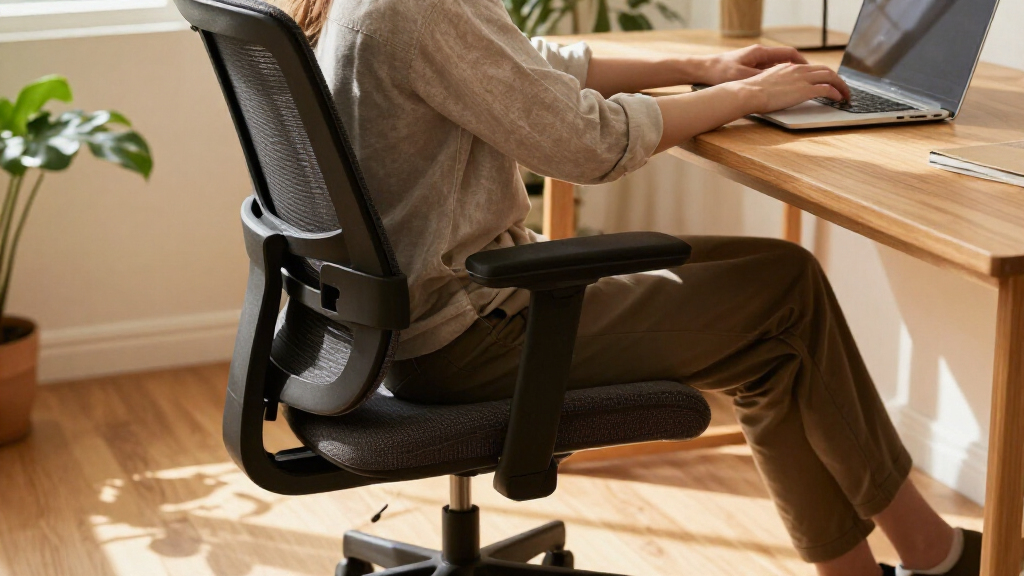
Start with the seat. Adjust the height so your feet rest on the floor or a footrest, with your knees around level with or slightly below your hips. This gives your legs a stable base; if your feet dangle, pressure can build under your thighs, while a seat set too low may leave you cramped. Seat depth matters too: you want most of your thighs supported, with a small gap between the seat edge and the backs of your knees. More depth can spread support across the thighs, but a seat that is too deep may press behind the knees or make you slide forward to reach the backrest. If the chair presses into your legs, it may be too deep for you.
Lumbar support should meet your lower back without digging in. Adjustable height or depth gives you more room to line it up, but the point is comfortable contact rather than forcing your back into one prescribed curve. A backrest that reclines lets you change position between tasks; leaning back comfortably is not automatically bad posture, and the ability to move can make a chair more useful through a varied workday.
Imagine you’re answering emails after lunch. If your feet are dangling and your lower back floats away from the backrest, a chair with an adjustable seat and lumbar support may let you settle into a more comfortable position. The adjustments only help if their range suits you and the controls are easy to use. A control you cannot reach or a support that only moves a little may add features on paper without solving the fit problem.
Products Worth Considering

LEVOIT Vital 200S-P Smart Air Purifier for Large Rooms

Dyson V9 Motorbar Cordless Vacuum

Levoit Core 600S-P Smart Air Purifier for Large Rooms up to 2933 ft²
As an affiliate, we earn on qualifying purchases.
Which adjustments matter most when you set up your chair?
To set up an office chair, support your feet first, then adjust the seat depth, back support, arms, and recline while checking how you feel at your desk. This order gives you a stable base before you fine-tune the upper body: changing seat height later can alter how your arms meet the desk and how your back meets the backrest. The aim is a comfortable working position you can change, not a pose you must hold all day.
- Set the seat height. Place both feet on the floor, or add a footrest if the desk makes you raise the seat. Your knees should sit around level with or slightly below your hips. If raising the chair helps you reach a tall desk but leaves your feet unsupported, a footrest preserves that leg support without forcing you to lower the chair and hunch toward the work surface.
- Check the seat depth. Sit back and leave a small gap behind your knees while keeping most of your thighs supported. If you’re short and the seat edge presses into your legs, look for a shallower seat or a depth adjustment. Too little depth can leave your thighs without enough support; too much can push you away from the backrest, so aim for a balance rather than maximum coverage.
- Line up the backrest. Move the lumbar support until it feels comfortably against your lower back. It should support you, not jab you each time you lean back. If it feels intrusive, try changing its height or depth before deciding that firmer support is better.
- Lower your shoulders. Adjust armrests so your arms can rest without lifting your shoulders or pushing your elbows wide. If they hit the desk, lower them or move them out of the way. Armrests that are too high can keep your shoulders raised; ones that are too low may tempt you to lean to one side for support.
- Check your reach. Position your keyboard and screen so you can work without reaching forward or leaning toward the display. Try a gentle recline and change position as the task changes. If the chair feels comfortable away from the desk but uncomfortable when you type, the desk or screen position may be working against the chair’s adjustments.
For example, if your desk is too high, raising the chair may free your knees but leave your feet unsupported. A footrest can bridge that gap. Chair setup works best when you adjust the workstation along with it, because compensating for one mismatch can create another if you ignore how the parts work together.
How do chair fit and desk setup work together?
A chair fits well when it lets you sit comfortably at your workstation, with your feet supported and your arms relaxed as you reach the keyboard. The chair is only one piece of that setup: desk height, screen placement, workload, and time spent in one position can also affect comfort. Even an adjustable chair can feel wrong if the rest of the workstation makes you lean or reach, because you may end up using the chair’s settings to compensate for a desk or screen that is out of place.
Say you’re working at a kitchen table that sits higher than your usual desk. You raise the chair to reach the tabletop, and suddenly your feet swing above the floor. A footrest may help, but you should also check that your armrests do not force your shoulders upward and that the screen is positioned where you can read without craning your neck. The tradeoff is that one adjustment can solve one problem while exposing another: raising the seat improves your reach to the table, but without foot support it can add pressure beneath your thighs.
There is no one perfect posture everyone needs to hold from morning to evening. A supported recline can feel comfortable for reading, while sitting more upright may feel easier for close keyboard work. Changing position matters: standing to refill your water, walking during a phone call, or briefly stretching can break up long stretches in one pose. This makes adjustability useful as a way to move among comfortable positions, rather than a way to lock yourself into a single “correct” one.
An office chair may help you find a comfortable sitting position, but it cannot by itself prevent or cure back pain. If discomfort is persistent or severe, talk with a qualified health professional. A chair is a useful part of your workspace, not a substitute for care or a promise of a particular health outcome.
Mesh or padding: which chair material suits your workday?
Mesh and padded chairs can both work well; the better choice depends on fit, construction, climate, upkeep, and what feels comfortable to you. Mesh backs often allow more airflow, which can matter in a warm room or during long sessions, while padded designs offer a softer contact surface and a different feel. Those benefits come with tradeoffs: mesh tension varies and may feel firm, while padding can retain more heat and compress with use. Material alone does not tell you whether the chair supports your body well.
| Feature | Mesh design | Padded design | What to check |
|---|---|---|---|
| Feel | Often firmer and springier | Often softer at first | Try sitting in it for more than a quick showroom moment |
| Heat | Open backs may feel cooler | Thicker upholstery may feel warmer | Think about room temperature and how you work |
| Wear and care | Mesh quality and tension vary | Fabric or cushioning may need regular cleaning | Check construction, cleaning guidance, and replacement parts |
Picture a warm home office where afternoon sun lands on your back. A breathable mesh back might feel pleasant there, but a poorly tensioned mesh seat can feel firm or uncomfortable. Someone who likes a softer seat may prefer padding, especially if the chair’s shape supports their legs without putting pressure behind the knees. A soft first impression is not enough to judge a full workday, since cushioning can feel different after extended sitting.
When possible, try the chair for a realistic stretch and make the adjustments you would use at home. If that is not possible, check the return window and read the actual dimensions. Comfort is personal, so a popular material or glossy product photo cannot make the decision for you. The most breathable or cushioned option still has to fit your body and allow you to move comfortably.
What should you check before spending money?
Before buying, compare the chair’s measured dimensions, adjustment ranges, build and service details, and return terms against your body and workspace. Price and feature count are clues, not proof of fit: a costly chair that does not support your legs comfortably is still the wrong chair for you. The practical value of an adjustment depends on whether its range addresses your needs; extra controls can also mean little if they are hard to reach or understand.
Use this short buying check when you compare ergonomic office chairs online or in a showroom:
- Fit: Check seat height and depth, seat width, backrest shape, and armrest range. Labels like “one size fits all” cannot tell you whether a chair suits a short or tall user. A seat that is wide enough may still be too deep, so compare each dimension against how you sit.
- Adjustability: Find out which parts move and by how much. A seat depth control is only useful if its range matches your legs. More adjustments can improve the chance of a close fit, but a smaller set of easy-to-use controls may be more useful than a complicated set that you rarely change.
- Comfort over time: If you can, sit and work in the chair long enough to notice pressure, heat, and whether you can change posture comfortably. A short sit can reveal an obvious mismatch, but it may not show how cushioning or pressure feels after several hours.
- Build and service: Read the warranty terms. Check whether the maker sells replacement parts and whether the return policy gives you a fair chance to try the chair. A warranty matters most when its coverage and exclusions are clear, while replacement parts may extend the chair’s useful life.
- Materials and upkeep: Consider cleaning needs, floor-friendly casters, upholstery wear, and any specific claims about recycled materials or repairability. A material that suits your climate may still require more maintenance, so weigh daily comfort against care.
- Price in context: Compare what the warranty and construction include. Paying more does not automatically mean a better match. A higher price may buy longer service or broader adjustability, but only if those benefits fit your needs.
For a home office used three days a week, you might prioritize a compact footprint and easy cleaning. For a chair used through full workdays, fit and adjustments may deserve more attention. Your hours of use change your priorities; the right shortlist reflects how you actually work, since a minor comfort issue can matter more when repeated over longer sessions.
What has changed in office chair shopping?
Chair shopping now often includes more adjustment choices, more sizing options, and more online fit information, but these broad market trends do not guarantee that a particular model suits you. Some product lines offer adjustable lumbar support, seat depth, armrests, and recline across more price ranges. The quality and usable range of those controls still vary from chair to chair, so the number of options matters less than whether they cover the positions your body needs.
More breathable backs, including mesh and hybrid materials, remain popular. Some makers also offer wider seats, different sizes, or higher weight capacities. Check the actual measurements and limits; a label like “large” cannot tell you whether the seat depth or armrest height fits your body. These options can widen the pool of plausible chairs, but they still need to be compared with your own dimensions and desk.
Hybrid work has made home office purchases more common, and buyers may balance budget, floor space, and appearance with comfort. A chair for occasional laptop sessions may call for different priorities than one used through long workdays. Retailers increasingly list dimensions and adjustment ranges online, which makes it easier to narrow choices before a showroom visit. That information can help rule out obvious mismatches, but it cannot tell you how pressure, support, or movement will feel in practice.
Look closely at environmental claims too. If a brand mentions recycled materials or repairability, check what materials it uses, which parts it can replace, and what the warranty covers. For example, a long warranty has more practical value when you can identify what it includes and how to get a replacement part. Repair options can extend a chair’s useful life, though their value depends on parts being available when you need them.
Frequently Asked Questions
Do ergonomic chairs prevent back pain?
An ergonomic chair may help you sit more comfortably, but it is not a guaranteed way to prevent or cure back pain. Desk setup, workload, health conditions, and long stretches without movement can also matter. Talk with a qualified health professional about persistent or severe pain.
How much should I spend on an ergonomic office chair?
There is no single right budget. Compare the chair’s fit, adjustment range, durability, warranty, and return terms with what you can spend. A higher price does not guarantee a better fit, so check dimensions before buying.
Is lumbar support necessary?
Many people like lower-back support, but the comfortable shape and position vary. Adjustable lumbar support can help you line it up with your back; it should feel supportive rather than press into you.
Do I need a headrest for desk work?
A headrest is optional for most desk tasks. It can feel useful when you recline or take a break, but a poorly placed one may get in the way. Check whether you can position it comfortably before treating it as a must-have.
How long should I sit in an office chair?
A comfortable chair is not a reason to sit continuously. Change position and take chances to stand or walk during your day; there is no single break schedule that suits everyone. Even a short walk to refill a glass of water can give you a change of posture.
Conclusion
Choose a chair you can adjust to your body and desk, then give yourself room to move through the day. Start with supported feet, a comfortable seat depth, and back and arm support that feels natural.
The best chair for you is the one that fits when you sit down and still lets you shift when you need to. Think of it as a good pair of shoes for your desk: supportive, personal, and made for the miles you actually walk.