TL;DR

Get comfort and recovery gear delivered free with Prime
- Fast, free delivery on millions of items
- Prime Video, Amazon Music and more included
- Member-only deals all year
Heated lumbar support cushions pair lower-back support with adjustable warmth, which may soothe stiffness or make sitting more comfortable for some people. Fit, power source, washable materials, and safety features matter as much as heat settings. Use the cushion as a comfort aid, take movement breaks, and ask a health professional about persistent or worsening pain.
A warm cushion can make a chilly office chair feel friendlier in minutes, but heat alone cannot make a poor fit comfortable. A heated lumbar support cushion combines a shaped backrest with gentle warmth, and each part does a different job: the shape supports your lower back while the heat adds a soothing sensation.
This guide explains what to look for in fit, heat controls, power, materials, and safety. You’ll also see how to use one in an office chair or car without treating warmth as a cure for back pain. For example, if a cushion pushes you so far forward that you perch on the seat edge, its extra heat probably won’t solve the bigger comfort problem.
Choose a shape and thickness that support your lower back without pushing you forward.
Check the power source, heat controls, washable cover, and safety instructions against where you will use the cushion.
Begin with low heat, follow the maker’s time limits, and stop if your skin feels irritated or too warm.
Take movement breaks; warmth does not cancel out long periods of sitting.
Get professional advice about persistent, worsening, or unexplained back pain, and ask before using heat if you have reduced sensation or circulation problems.
What a Heated Lumbar Cushion Can Do for Your Sitting Comfort
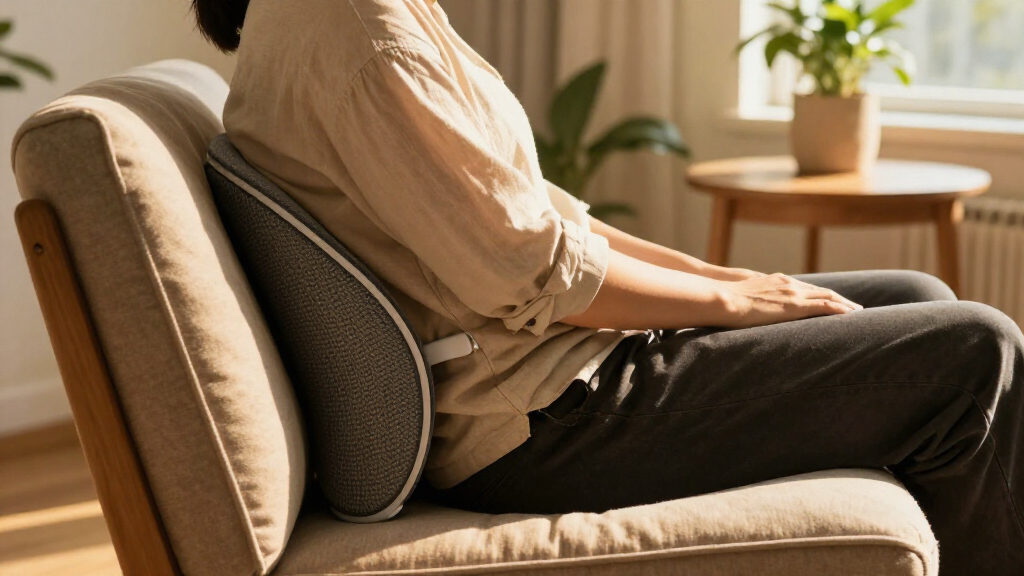
A heated lumbar support cushion combines lower-back support with low-level warmth to make sitting more comfortable for some people. Its curved shape rests behind your waist, while an embedded heating element warms part or all of the backrest. It may ease the feeling of stiffness temporarily, but it does not treat the underlying causes of back pain.
Think of the cushion as a small comfort layer, like a warm scarf on a cold day. It can make the moment feel better without changing the source of the chill. If you have been sitting for two hours and your lower back feels tight, gentle warmth may feel welcome; getting up and walking around still changes the sitting pattern that may be bothering you.
The two functions need separate checks. Support depends on shape and fit, while warmth depends on the heater, controls, and safe use. The distinction matters because comfort is not proof that the cushion is supporting you well: heat can make an awkward position feel temporarily more tolerable, allowing you to stay in it longer. Cushions combine back support with low-level heat in different ways, and a thick cushion that heats evenly can still feel wrong if it forces your shoulders forward or leaves your feet dangling.
For instance, a compact cushion may sit neatly against a firm dining chair but slide down a broad office chair. Consider heat a comfort feature, not proof of better support or a substitute for movement. If you feel better only while the cushion is warm, that describes a short-term comfort response; it does not identify why your back feels stiff.
Products Worth Considering

Bose SoundLink Plus Portable Bluetooth Speaker, Wireless Outdoor Speaker, Up to 20 Hours Battery Life, Waterproof and Dustproof, Black

Bose SoundLink Flex Bluetooth Speaker (2nd Gen), Waterproof, Dustproof, USB‑C, Up to 12 hr Battery, Black

Levoit Vital 100S-P Air Purifier with Washable Pre-Filter
As an affiliate, we earn on qualifying purchases.
Choose a Shape That Supports Your Back Without Shoving You Forward
The right lumbar cushion supports the natural inward curve of your lower back without pushing your body too far forward. Look at the cushion’s height, thickness, firmness, and straps alongside your chair dimensions. These details work together: a tall cushion may reach the right area but press too strongly, while a soft one may feel pleasant at first and compress until it offers little support. A cushion can be comfortable in a showroom and awkward at your desk if its shape moves you away from the seat back.
Picture an ordinary workday: you sit down with your feet flat, then add a bulky cushion and find your knees no longer bend comfortably at the seat edge. The heater may feel pleasant, but your seating position has changed. That tradeoff matters because an improvement in warmth is not useful if the added bulk makes the rest of your posture uncomfortable. A thinner, firmer model with adjustable straps could work better in that chair, while a deeper chair may fit a thicker cushion.
Use this quick fit check before you settle in for a long session:
- Measure the seat back and compare it with the cushion’s height and width.
- Attach the straps so the cushion stays in place when you lean forward and sit back.
- Sit for several minutes with your feet supported and shoulders relaxed.
- Adjust or remove it if it presses into one spot, makes you perch, or changes your posture in an uncomfortable way.
A cushion should feel like a steady hand behind your waist, not a wedge forcing you into a pose. Straps can help prevent sliding, but they cannot make an unsuitable shape fit your chair. If your chair and cushion do not work together, repositioning or choosing another size may matter more than adding another heat setting.
Compare Heat Controls, Power, and Materials Before You Buy
Choose a cushion by how you will use it: check the heat settings, power source, cover, and cleaning instructions before you pay. A cushion for a desk beside a wall outlet has different needs from one you plan to use during a car commute. The tradeoff is convenience versus compatibility: portable power can make a cushion easier to move, but only if the connection is approved for that model and gives it the power it needs. More features can be convenient, but they do not automatically mean better comfort.
Consider a cold morning when you move from your home office to a car. A wall adapter might suit the desk, while a model with a vehicle-compatible 12-volt connection may suit the commute. USB power is another option on some models, but check the manufacturer’s specifications and power requirements instead of assuming any port will work. Similarly, a removable cover is useful only if its care instructions suit your routine; a cover that cannot be washed may require more careful spot cleaning.
| Feature | What to check | Everyday example |
|---|---|---|
| Heat controls | Settings, warm-up time, zones, and shutoff instructions | Separate controls can let you warm your back without raising the whole cushion’s temperature. |
| Power | Wall adapter, USB connection, or vehicle outlet compatibility | A desk user near a socket may not need a portable power option. |
| Cover | Breathability, durability, and whether it can be removed and washed | A washable cover helps after daily use, especially if you eat lunch at your desk. |
| Safety | Clear instructions and features such as overheat protection or automatic shutoff | A shutoff feature may help prevent heat from running beyond the maker’s stated limit. |
Settings and safety features shape how easy it is to manage warmth, but they do not remove the need to follow the instructions. A shutoff can limit how long the heater runs; it does not guarantee that every temperature is comfortable for every person. Some products also add massage or vibration. Treat these as optional extras, not evidence that a cushion prevents or treats a back condition. For current models, prices, and specific features, check recent manufacturer information and independent product reviews.
Use Warmth as a Short Comfort Break, Not an All-Day Fix
Start with a low heat setting and follow the product’s time limits; stop if your skin feels uncomfortable, too warm, or irritated. A comfortable temperature for one person may feel excessive to another. Starting low gives you a chance to judge your response before more heat builds up, while increasing the setting or duration can raise discomfort and burn risk without addressing the reason sitting feels difficult.
Imagine finishing a brisk walk and settling into a cool car seat. A short spell of gentle warmth may feel soothing as you start the drive, but a cushion cannot make a long, motionless commute disappear from your day. At a desk, set a reminder to stand, stretch, or walk every so often; changing position interrupts a long spell of sitting, while warmth mainly changes how the area feels. One benefit does not replace the other.
Follow the manufacturer’s instructions, and avoid falling asleep with the heater on unless the maker explicitly says that use is allowed. If you have reduced skin sensation or circulation problems, or you find it hard to judge temperature, heat may pose a greater burn risk because discomfort may be harder to notice or respond to promptly. Ask a qualified health professional before using the heat feature if that applies to you.
Comfort should feel gentle, not numb or burning. Turn the heat off as soon as your skin feels irritated or overly warm.
A heated lumbar support cushion may help with temporary comfort, but persistent, worsening, or unexplained back pain deserves professional advice. The reason matters: a cushion may change how sitting feels, but it cannot determine what is causing the pain or whether a different response is needed. A cushion is a sitting aid, not a diagnosis or a treatment plan.
Keep the Cushion Clean and Check It Before Each Use
Keep electrical and heating components dry, and follow the cushion’s care label for cleaning. Many designs have a removable cover that you can wash separately, but the heating element itself generally should not go in a washing machine or be submerged. This distinction matters because water or rough washing may damage parts that control and distribute the heat. Check the product instructions first; covers and electrical parts vary by model.
For example, if you spill coffee at your desk, unplug the cushion and check its care label before removing or washing the cover. Wiping the outer surface may be all the manufacturer permits. Treating the whole cushion like an ordinary pillow can damage its electrical components or leave it unsafe to use; following the label may take longer, but it helps avoid turning a small spill into a reason to replace the cushion.
Before switching it on, look for frayed cables, loose plugs, or damaged fabric around the heating area. These checks matter because visible wear can signal that the heater or its wiring is no longer protected as intended. Stop using the cushion if you find damage, and consult the manufacturer’s guidance. In a car, place the cable so it stays clear of pedals and other controls, and make sure the cushion does not interfere with the seat belt or airbags; a cable or cushion in the wrong place can affect safe control of the vehicle.
- Read the care instructions before washing a removable cover.
- Unplug before cleaning and keep the heater and controls dry.
- Inspect the cord and cushion for visible wear before use.
- Follow vehicle guidance and keep cables away from driving controls.
These small checks fit easily into a routine. Think of them as checking the zipper on a coat before heading into the rain: a few seconds can prevent an avoidable hassle later.
Match the Cushion to Your Chair, Routine, and Real Needs
The best cushion is the one that fits your seat and routine, not the one with the longest feature list. Before buying, decide where you will use it most, how you will power it, and whether its dimensions will change your seating position. These choices have practical consequences: a model that is easy to move may be less stable, and one with extra controls may add complexity without improving the fit. The key facts for comparing models are practical: fit, firmness, controls, care, and safety instructions.
A person working at a desk near an outlet might favor a stable cushion with a washable cover and a simple heat control. Someone who drives to work may instead need a vehicle-compatible model and a cable arrangement that stays clear of the pedals. A small apartment chair or shared office seat could call for a slimmer cushion that is easy to move between chairs, though changing chairs often makes secure straps and compatible dimensions especially useful.
Many heated cushions are typically used at home, in office chairs, or in vehicles, but one model may not suit every setting. A cushion’s portability matters less if it shifts around or leaves you sitting awkwardly. Check that the cushion is intended for your use and that you can sit comfortably with it in place. If a product’s dimensions or power details are unclear, look for the manufacturer’s specifications and current independent reviews before deciding.
Remember that warmth and back support are separate features. A cushion that feels warm but pushes you forward is a poor fit for that chair. A well-fitting cushion used for sensible, limited warmth may feel like a small comfort upgrade during a chilly afternoon—while breaks and changes in position remain part of the routine. That balance helps you judge the product by what it can actually provide: a more comfortable sitting experience, not a replacement for movement or care when pain persists.
Frequently Asked Questions
Do heated lumbar cushions help back pain?
They may offer temporary soothing warmth or make sitting more comfortable for some people. Results vary, and a cushion does not treat every cause of back pain. If pain persists or gets worse, ask a qualified health professional for advice.
Are heated lumbar cushions safe to use in a car?
Use a cushion designed for vehicle use and follow its instructions. Keep cables clear of pedals and controls, and check that the cushion does not interfere with your seat belt or airbags. Stop using it if it affects safe driving.
How long should I use the heat setting?
Follow the product’s directions, start with a low setting, and stop if your skin feels overly warm or irritated. Do not fall asleep with the heater on unless the manufacturer explicitly permits it.
Can I use a heated lumbar cushion all day?
Check whether the manufacturer allows extended use, since instructions and time limits vary. Take regular movement breaks even if the cushion feels comfortable, and remember that continuous heat may not suit everyone.
Can I wash the whole cushion?
Check the care label. Some models have a removable, washable cover, while the heating element, controls, and electrical parts generally need to stay dry and out of the washing machine.
Who should take extra care with heated cushions?
People with reduced skin sensation, circulation problems, or difficulty judging temperature may be more vulnerable to burns. Ask a qualified health professional before using the heat feature if any of those apply to you.
Conclusion
Choose for fit first and warmth second. A cushion should sit securely behind your lower back, work with your chair and power source, and let you follow the maker’s safety and care instructions. Use gentle heat as a comfort feature, then keep moving through your day.
When your chair feels less like a cold stone bench and more like a place you can settle, remember to stand up now and then. The best comfort break still starts with getting out of the seat.