
TL;DR

Get comfort and recovery gear delivered free with Prime
- Fast, free delivery on millions of items
- Prime Video, Amazon Music and more included
- Member-only deals all year
You can turn one video into a complete publishing kit—like clips, titles, descriptions, and social posts—without uploading to the cloud. This local-first workflow saves time, boosts privacy, and keeps control in your hands, making content management faster and more secure.
Imagine finishing a video and instantly having a full set of ready-to-publish assets—titles, clips, social media posts—all on your local machine. No waiting for cloud processing or worrying about data privacy. That’s the promise behind a workflow that turns one video into a complete publishing kit, entirely offline.
This approach isn’t just about convenience; it’s a game-changer for creators who want speed, security, and total control over their content. In this article, you’ll see how a local-first system can streamline your publishing, reduce dependency on cloud servers, and give you more confidence in your workflow.
Key Takeaways
- A local-first workflow analyzes your video on multiple levels—audio, visuals, and meaning—producing complete assets for publishing.
- You can generate a full set of assets, including titles, descriptions, clips, and social posts, without uploading your content to the cloud.
- This approach gives you faster turnaround, more control, and better privacy—ideal for creators and teams who value independence.
- Step-by-step, you can build your own offline publishing system using tools like ChannelHelm, which supports multi-platform delivery and asset management.
- While automation handles heavy lifting, your creative input remains vital for authentic, on-brand content.
As an affiliate, we earn on qualifying purchases.
How a Local Workflow Turns One Video Into Everything You Need
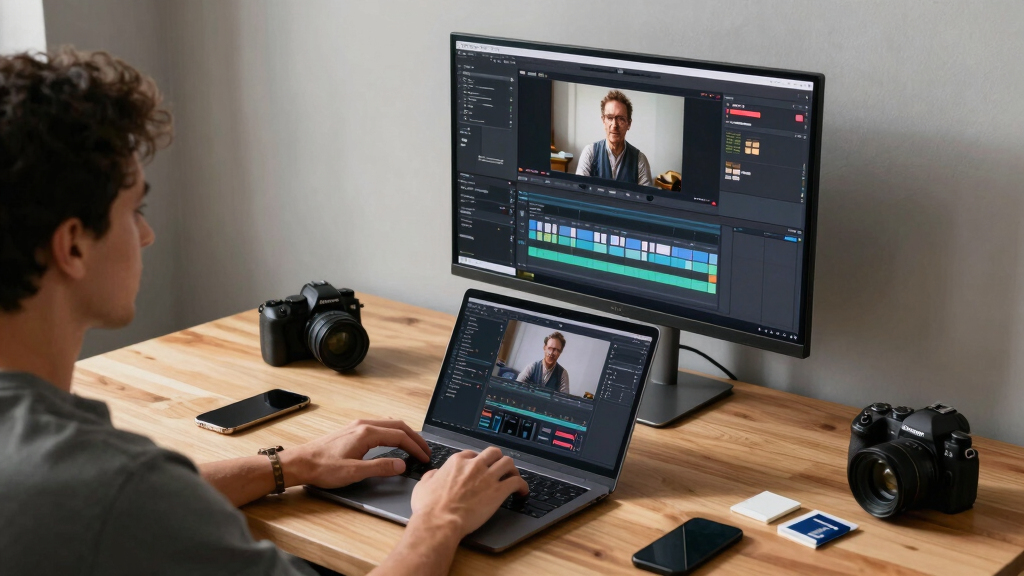
When you drop a video into a local system, it doesn’t just sit there. It gets analyzed on four levels: audio, visuals, combined scene data, and intelligent topic extraction. This detailed understanding isn’t just for convenience; it’s pivotal for efficient content creation. By understanding the content deeply, the system can suggest relevant titles, craft engaging clips, and generate social snippets that resonate with your audience. This process reduces manual guesswork, speeds up production, and ensures consistency across assets. Learn more about local content analysis.
Think about it: a video with rich, layered insights allows you to make data-driven decisions about what parts to highlight, how to frame your message, and which elements to emphasize. This analysis turns raw footage into a strategic asset, enabling creators to produce polished, targeted content faster. The tradeoff is that this depth of analysis requires sophisticated algorithms running locally—meaning a more capable hardware setup—but the payoff is greater control, privacy, and efficiency that cloud-based systems often can’t match.
As an affiliate, we earn on qualifying purchases.
What’s Included in a Publishing Kit? Think Beyond Just the Video
A true publishing kit isn’t just a collection of raw assets; it’s a curated set of components designed to maximize your content’s reach and engagement. This includes a compelling title that captures attention, a detailed description that provides context, engaging thumbnail ideas to entice viewers, social snippets that spark sharing, and multiple video formats tailored to different platforms. You can generate these assets locally, maintaining full control over your messaging. Explore how to build a comprehensive publishing kit.
For instance, a single video can be repurposed into a YouTube title optimized for search, short TikTok clips that emphasize humor or trendiness, Instagram reels that are visually striking, and blog drafts that add depth. When all these elements are generated locally, you retain full control over the messaging and presentation, ensuring brand consistency. The tradeoff is that creating such a comprehensive set requires sophisticated tools and some initial setup, but the benefit is a faster, more cohesive publishing process that keeps your brand voice intact across channels.

As an affiliate, we earn on qualifying purchases.
Why Going Local Beats Cloud for Publishing Assets
Moving away from cloud reliance isn’t just about avoiding internet issues; it’s about fundamentally changing how you control and secure your content. Cloud workflows introduce dependencies—like internet speed, server availability, and subscription costs—that can slow down production and create vulnerabilities. In contrast, local processing grants you immediate access to assets, enabling rapid iteration and decision-making. Learn more about local processing benefits.
Furthermore, local workflows enhance privacy. You’re not transmitting your raw footage or proprietary edits over the internet, reducing the risk of leaks or data breaches. This is especially important for creators handling sensitive or exclusive content. The tradeoff is that local systems demand more from your hardware and require you to manage updates and backups, but these are manageable with proper setup. Overall, the shift to local processing empowers creators with faster turnaround times, greater control, and stronger privacy protections—advantages that often outweigh the convenience of cloud services.

As an affiliate, we earn on qualifying purchases.
How to Build Your Own Offline Publishing Kit in 4 Simple Steps
- Drop your video or paste a link: The system scans and analyzes your content immediately, setting the foundation for asset generation.
- Let the system understand and draft assets: Titles, descriptions, clips, and snippets are generated in seconds, based on detailed content analysis.
- Review and customize: You can tweak the generated assets directly on your machine, ensuring they align with your voice and goals, all without needing an internet connection.
- Publish or save for later: Export all assets for immediate deployment or store them locally for future use, maintaining full control over your publishing schedule and channels.
Distribution Options: Your Content, Your Control
From a single core video, a local system allows you to prepare and push assets to multiple platforms—YouTube, TikTok, Instagram, Facebook—without relying on cloud intermediaries. Each asset can be customized for its specific platform, with correct formats, optimized titles, and hashtags, ensuring your content looks professional and performs well. Managing distribution offline helps maintain consistency across channels. Discover how to streamline multi-platform publishing.
By managing distribution offline, you eliminate the need for multiple uploads and reduce the risk of errors or mismatched branding. This centralized control accelerates multi-platform publishing, allowing you to adapt quickly to trends or feedback. The key implication is that your entire content pipeline becomes more agile, cost-effective, and reliable, especially when working with large volumes of content or tight deadlines.

Asset Reuse and Versioning — Keep Your Content Fresh and Organized
Effective management of assets isn’t just about storage; it’s about strategic reuse and precise version control. A local workflow allows you to efficiently organize and reuse your content assets. update titles, re-edit clips, and regenerate social posts quickly because everything is stored on your device. Unlike cloud systems that may require re-uploading or complex synchronization, local versioning keeps your workflow seamless and responsive.
This capability means you can refine your content iteratively—changing headlines, adjusting clips, or updating social snippets—without losing previous versions or interrupting your schedule. It also enhances your ability to maintain consistency across campaigns, ensuring that updates are reflected everywhere. The tradeoff involves organizing your files and managing backups effectively, but with proper practices, this system fosters a more agile and controlled content pipeline.

Quality Control, Speed, and Privacy — What Are the Tradeoffs?
Processing locally means you can achieve faster turnaround times because there’s no need to upload or download large files, and you can review assets instantly. This immediacy is vital for maintaining a quick publishing cycle and adapting content on the fly. Additionally, privacy is significantly enhanced since your raw footage and edits stay on your device, reducing exposure to breaches or leaks that can occur with cloud storage.
However, this speed and privacy come with tradeoffs. High-performance hardware is often necessary to handle complex AI processing, especially for large or high-resolution videos. If your equipment is older or less capable, processing times may slow down, and some advanced features might be unavailable or less effective. Moreover, managing updates, backups, and hardware maintenance becomes your responsibility, which can be a learning curve for some creators. Balancing these factors depends on your resources and priorities, but many find that the benefits of local control outweigh the hardware investments needed.

What Still Needs Human Hands? Balancing Automation and Creative Control
Automation excels at handling repetitive, time-consuming tasks—transcriptions, scene detection, clip creation, and generating drafts—which frees you to focus on the creative aspects. However, these automated processes can’t replace the nuanced judgment, style, and strategic thinking that only a human can provide. Your creative oversight ensures that the final content aligns with your brand voice, appeals emotionally, and reflects your unique perspective.
For example, AI might suggest a catchy title or highlight certain clips, but it’s your responsibility to decide if those suggestions truly fit your message. Adjusting tone, refining edits, and personalizing social posts are critical steps that automation can support but not fully replace. This balance ensures efficiency without sacrificing authenticity, making your content both professional and genuinely yours.

Tools and Resources to Start Your Local Publishing Journey
Ready to get started? Check out [ChannelHelm](https://channelhelm.com/), a local-first, video-to-publishing command center that handles everything from analysis to asset generation without cloud dependence. Investing in a capable machine, exploring automation scripts, and setting up a dedicated workspace will help you streamline your content production process. As tools continue to evolve, mastering local workflows puts you in control of your content’s lifecycle, from raw footage to published assets. The future of publishing is in your hands—literally.
Frequently Asked Questions
Can I really do all this offline, without an internet connection?
Yes. A well-designed local system processes videos entirely on your machine. You’ll need internet only for initial setup or updates, but most core functions run offline.
What kind of hardware do I need to run a local publishing workflow effectively?
A mid-range modern laptop or desktop with a good processor, at least 16GB RAM, and a decent GPU will handle most tasks smoothly. For intensive AI features, a dedicated GPU speeds things up.
How does this approach compare cost-wise to cloud services?
While initial hardware investment might be higher, avoiding ongoing cloud subscription fees saves money over time. Plus, you gain privacy and faster turnaround, making it a smart long-term choice.
Is there a risk of losing work if my local system crashes?
Regular backups and version control are essential. Using an organized workflow ensures you can recover assets quickly if needed, just like with cloud storage.
Can I integrate this workflow with existing cloud platforms if needed?
Absolutely. Many local tools can export assets or links to cloud platforms, giving you flexibility. You control whether to keep everything offline or sync when necessary.
Conclusion
Turning a single video into a full publishing kit without the cloud isn’t just a tech trick—it’s a shift toward more control, speed, and privacy. As tools evolve, your ability to manage content locally becomes a competitive edge.
Imagine the freedom of processing, reviewing, and publishing everything on your own terms—faster, safer, and more aligned with your style. That’s the future of content creation, where one video truly becomes a complete publishing ecosystem.

Fall Picks
fall essentials
As an affiliate, we earn on qualifying purchases.