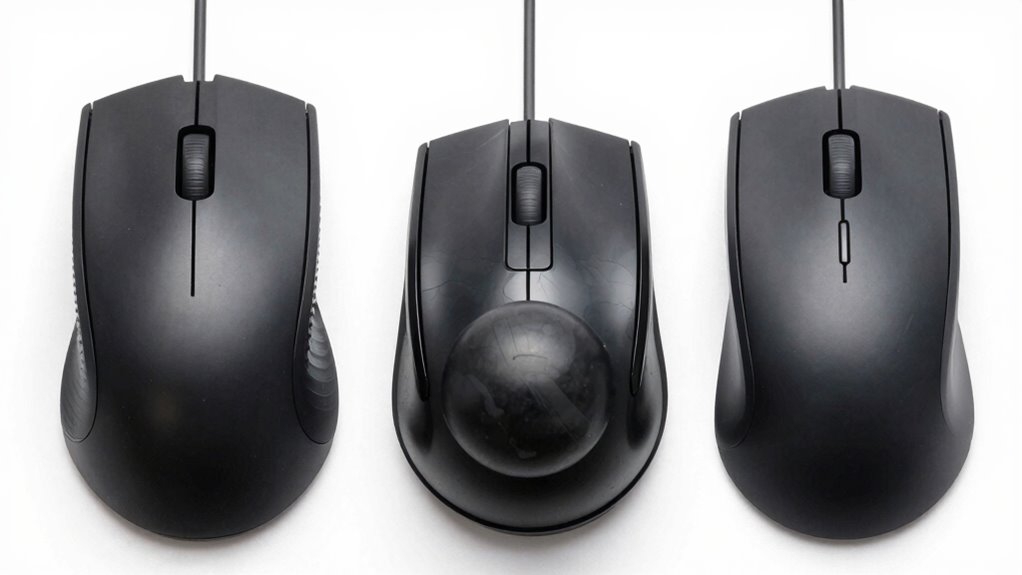

Vertical mice promote a natural handshake posture, reducing wrist strain and helping prevent long-term musculoskeletal issues, making them ideal for long work sessions. Trackballs stay stationary, allowing you to control the cursor with your thumb or fingers, which minimizes arm movement and fatigue. Standard mice are traditional devices that often offer quick, precise movements but may cause discomfort over time. Understanding these differences can help you choose the right device for better comfort and productivity. Keep going to discover more details.
Key Takeaways
- Vertical mice promote a natural handshake posture, reducing wrist rotation compared to standard mice.
- Trackballs use a stationary ball for cursor movement, offering precise control with minimal hand movement.
- Standard mice require more wrist and arm movement, which can lead to strain over prolonged use.
- Vertical mice are designed for ergonomic comfort, helping prevent musculoskeletal issues during long sessions.
- Trackballs are ideal for limited desk space and precise tasks, while standard mice are commonly used for general computing.

Vertical mice are designed to promote a more natural hand position. Instead of the typical palm-down grip, they encourage a handshake posture, reducing wrist rotation and strain. This ergonomic benefit can be a game-changer if you experience discomfort or repetitive strain injuries from traditional mice. Vertical mice often feel bulkier at first, but once you adapt, many find they can work longer without fatigue. When it comes to gaming performance, vertical mice may not offer the same level of precision or speed as traditional gaming mice, but they can still serve well for casual gaming or tasks that require comfort over quick reflexes. Understanding ergonomic benefits can help you select a device that promotes better posture and reduces strain over time. Additionally, ergonomic design plays a crucial role in preventing long-term musculoskeletal issues for frequent computer users. Incorporating regional culture in your workspace setup can enhance comfort and mental well-being during long hours of work. Recognizing the importance of ergonomic principles can further improve your overall comfort and productivity.

Anker 2.4G Wireless Vertical Ergonomic Optical Mouse for Work, Multi-Device Connectivity, 800/1200 /1600 DPI, 5 Buttons for Laptop, Desktop, PC – Black
Experience enhanced comfort and productivity with the Anker 2.4G Wireless Vertical Ergonomic Optical Mouse. Its scientifically designed ergonomic…
As an affiliate, we earn on qualifying purchases.
As an affiliate, we earn on qualifying purchases.
Frequently Asked Questions
Are Vertical Mice Suitable for Gaming?
Vertical mice aren’t ideal for gaming because they prioritize ergonomic benefits over gaming performance. While they reduce wrist strain and increase comfort during long sessions, their shape can hinder quick, precise movements needed in fast-paced games. If you want better gaming performance, a traditional or gaming-specific mouse is recommended. Vertical mice excel in ergonomic benefits but may compromise your agility and responsiveness during intense gaming sessions.
How Do Trackballs Impact Desk Space?
Trackballs save desk space because they don’t require the extensive arm movement of traditional mice, allowing you to keep your workspace more organized. Their compact design enhances ergonomic efficiency, reducing strain on your wrist and arm. By eliminating the need for a large mouse pad and extra movement, you can maintain a clutter-free desk while enjoying precise control. This makes trackballs ideal for small or crowded workspaces.
Can I Switch Between Different Types Easily?
Yes, you can switch between different types easily if they share compatible connections and your device supports ergonomic design. Most modern mice, trackballs, and vertical mice connect via USB or Bluetooth, making the changeover straightforward. Just make certain your device has the necessary device compatibility. Adjusting to different ergonomic designs might take some time, but switching is generally simple, allowing you to find the most comfortable option for your workspace.
Which Mouse Type Is Best for Ergonomic Health?
A vertical mouse is best for ergonomic health because it promotes a natural hand posture, reducing strain and discomfort. Its design encourages your wrist and arm to stay in a more neutral position, which helps prevent repetitive strain injuries. Trackballs minimize wrist movement further, offering ergonomic benefits, while standard mice may strain your hand over time. Choosing the right type depends on your comfort, but vertical mice generally support better ergonomic health.
Do All Mice Work With Gaming Software?
Not all mice work seamlessly with gaming software; it depends on hardware compatibility and software customization options. Many gaming mice are designed to integrate easily with popular gaming software, allowing you to customize buttons and sensitivity. However, some standard or ergonomic mice lack this flexibility. Before choosing, check if the mouse supports your preferred gaming software and offers customization features to enhance your gaming experience.

Logitech Ergo M575S Wireless Trackball Mouse, Wireless Ergonomic Mouse with Bluetooth and Encrypted Dongle, Comfortable Thumb Control, Precise and Smooth Tracking, for PC/Mac – Black Silver Ball
Less Movement, More Comfort: The sculpted shape of the ERGO M575S wireless trackball mouse keeps your hand relaxed…
As an affiliate, we earn on qualifying purchases.
As an affiliate, we earn on qualifying purchases.
Conclusion
Just like the legendary tales of Hercules and his labors, choosing the right mouse can ease your daily tasks and prevent fatigue. Whether you opt for a vertical mouse, trackball, or standard mouse, understanding their differences helps you pick what suits your needs best. Think of it as finding your own Excalibur—an extension of yourself that makes your work smoother and more comfortable. Ultimately, the right device turns everyday clicking into a hero’s journey.

JYWYBF Ergonomic Mouse Pad with Wrist Rest, Gel Wrist Support Mousepad, Pain Relief Laptop Computer Mouse Pad, Non-Slip Mouse Pads for Office & Home (Black, 9.5 x 8.3 in)
EFFECTIVE RELIEF OF WRIST STRAIN: This is a wrist support mouse pad with a unique comfort gel padded…
As an affiliate, we earn on qualifying purchases.
As an affiliate, we earn on qualifying purchases.

Razer Pro Click V2 Vertical Wireless Mouse: 6 Button Ergonomic Design – One Click AI Prompt – Supports Windows & Mac – Multi Device Connectivity via 2.4GHz, Bluetooth, or USB C Wired Mode – Chroma RGB
VERTICAL 6 BUTTON ERGONOMIC DESIGN WITH BASE SUPPORT — Shaped for a natural handshake grip, its angled design…
As an affiliate, we earn on qualifying purchases.
As an affiliate, we earn on qualifying purchases.