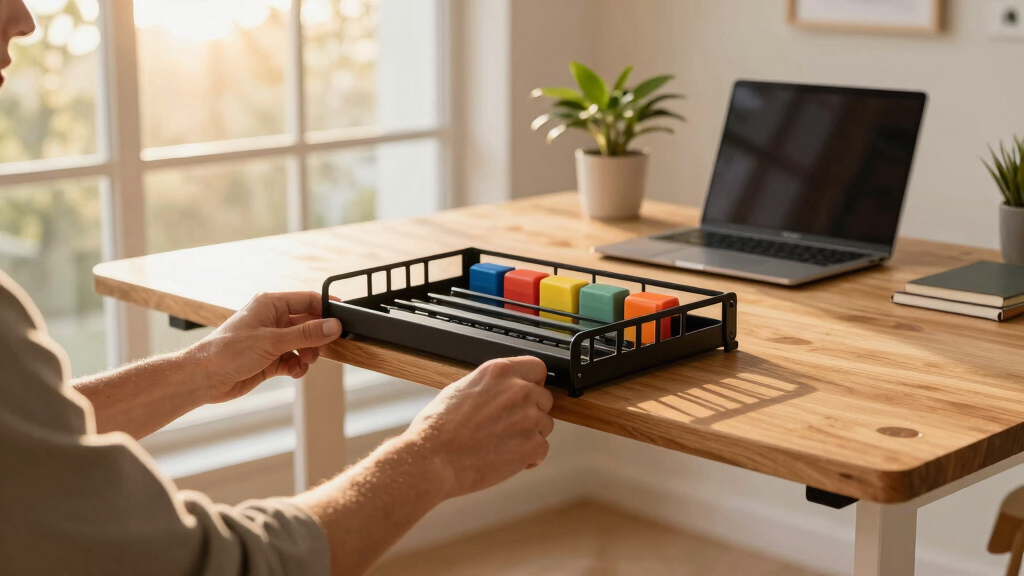

Choosing the right cable tray for a standing desk can transform your workspace. The Under Desk Cable Management Tray No Drill stands out for quick, damage-free installation, making it perfect for renters or those who frequently rearrange. The Univivi No Drill Under Desk Cable Management Tray offers a generous 36-inch capacity suitable for multiple devices, ideal for heavy setups. Meanwhile, the PAMO Cable Management Under Desk features an accessible beveled design, perfect for those who need frequent cable adjustments. Each option balances ease of installation, capacity, and design, but involves tradeoffs like size or installation style that buyers should consider.
Key Takeaways
- Ease of installation varies: clamp-on options avoid drilling but may have size limits.
- Capacity ranges from compact to large, influencing suitability for number of devices.
- Material quality impacts durability—metal mesh and fabric options differ in dust resistance and strength.
- Design features like beveled access improve usability but may add complexity.
- Price and features often correlate, so consider your workspace size and cable needs carefully.


More Details on Our Top Picks
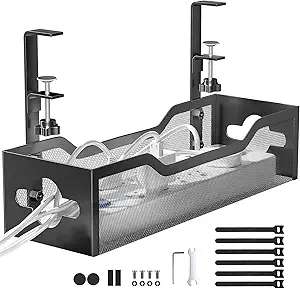
Under Desk Cable Management Tray No Drill, Metal Mesh Cable Management Under Desk with Clamp Mount, 2 Hole Cable Tray with Wire Management and Cord Organizer for Home Office Standing Desk
This tray excels in simplicity thanks to its no-drill clamp design. It installs in under three minutes, making it perfect for those who want a clean look without damaging their desk. The mesh design offers excellent ventilation and dust resistance, while the sturdy metal construction can support about 15 lbs. Compared with larger trays, this model is more compact, which might limit capacity but ensures a tidy, unobtrusive setup. The rubber pads protect your desk surface, a thoughtful touch that prevents scratches. If your priority is quick installation and a neat workspace, this tray delivers.
Pros:- Easy no-drill clamp installation
- Supports up to 15 lbs
- Dust-resistant mesh design
- Desk-surface protective rubber pads
Cons:- Limited capacity for large setups
- Mesh may be less discreet for certain aesthetics
- Supports only desks 0.4-2 inches thick
Best for: Users who need a quick, damage-free installation without sacrificing organization.
Not ideal for: Those with very thick desks or extensive cable setups requiring larger capacity.
- Material:Carbon Steel
- Support Weight:15 lbs
- Installation Type:Clamp-on
- Desk Thickness Compatibility:0.4-2 inches
- Size:17.7 x 7.9 inches
- Design:Metal Mesh
- Color:Black
- Mounting Style:Side Clamps
- Dust Resistance:Yes
Bottom line: A highly convenient, sturdy solution ideal for renters and those who want a quick upgrade.
Univivi No Drill Under Desk Cable Management Tray, 36″ Cord Organizer for Table, Clamp/Screw Mount Desk Cable Management, Premium Fabric Cable Management Tray for Office, Home
This tray is notable for its 36-inch length and high capacity, making it suitable for extensive setups with multiple power strips and accessories. The combination of clamp and screw mounting offers flexibility for various desk materials, and the fabric design adds a sleek, modern look that also helps hide cables effectively. Compared to metal mesh trays, this fabric option is less dust-prone but may be less durable under heavy weight. The unfoldable design makes it easy to add or remove items, and the included ties help with cable organization. For users with many devices, this tray provides ample space and a clean appearance.
Pros:- Long 36-inch capacity
- Flexible clamp/screw mounting
- Unfolding design for easy access
- Includes cable ties for organization
Cons:- Fabric material may wear over time with heavy use
- Bulkier size may not fit all desks
- Requires measuring desk space before purchase
Best for: Professionals needing large capacity, especially with multiple devices and power strips.
Not ideal for: Those preferring a minimal, metal aesthetic or with limited under-desk space.
- Material:Oxford Fabric
- Size:36 x 5.5 x 5.5 inches
- Support Weight:Supports multiple devices
- Installation:Clamp and screw mount
- Design:Fabric
- Color:Black
- Unfoldable:Yes
- Cable Ties Included:Yes
- Dust Resistance:Moderate
Bottom line: Ideal for heavy multi-device setups where capacity and organization are priorities.
PAMO Cable Management Under Desk for Easy mounting Under-Table I Set of 2 – with 10X Cable Ties I Desk Organizer for Office/Home Office Table
This set stands out for its beveled, easy-access design, perfect for users who need to frequently add or change cables. Made from sturdy 1mm steel, it supports large power supplies and multiple sockets with ease. The included reusable cable ties enhance organization, and the set’s two-part design makes it versatile for different desk sizes. Compared to mesh or fabric trays, this option offers a more accessible approach, but it may not hide cables as well and requires screw installation, which might be less ideal for renters. It’s a solid choice for those who prioritize cable access over aesthetics.
Pros:- Easy-access beveled design
- Supports large power supplies
- Includes 10 reusable cable ties
- Sturdy steel construction
Cons:- Requires screw mounting
- Less dust-resistant than mesh or fabric
- Installation takes longer than clamp-only options
Best for: Users who need frequent cable adjustments or access, like gamers or tech enthusiasts.
Not ideal for: People seeking a damage-free, no-drill setup or minimalistic aesthetics.
- Material:Steel
- Size:44 x 10 x 12 cm per piece
- Support Weight:Heavy-duty
- Installation:Screw-in included
- Design:Beveled, accessible
- Cable Ties:10 included
- Color:White, Black, Silver
- Support for Heavy Devices:Yes
- Dust Resistance:Moderate
Bottom line: Perfect for tech-heavy setups requiring frequent cable changes and access.
Cable Management, 25” Cable Management Under Desk No Drill, Metal Cord Organizer with Clamp for Standing Desk, Cable Organizer for Home Office, Black
This 25-inch metal tray with a straightforward clamp offers a large, ventilated space for all your cables, supporting up to 15 lbs. Its mesh structure ensures good airflow and dust resistance, and the clamp makes installation quick and damage-free. Compared to fabric or larger capacity trays, this model is compact but still provides enough room for most setups. The open design makes cable adjustments easy, though it may not conceal cables as effectively. It’s suitable for those who want a balance of capacity, airflow, and simplicity, especially in standing desk configurations.
Pros:- Large size supports many cables
- Mesh for ventilation
- No-drill clamp installation
- Supports up to 15 lbs
Cons:- Less concealment of cables
- Open mesh may accumulate dust
- Limited aesthetic options
Best for: Standing desk users needing a large, ventilated tray that’s easy to install.
Not ideal for: Those with very extensive cable needs or seeking a fully hidden setup.
- Material:Sturdy Metal
- Size:25 x 3.5 inches
- Support Weight:15 lbs
- Installation:Clamp-on
- Design:Mesh
- Color:Black
- Dust Resistance:Yes
- Ventilation:Excellent
- Aesthetic:Minimal
Bottom line: A reliable, large-capacity solution for everyday cable management under standing desks.

How We Picked
Our selection focused on cable trays that are compatible with standing desks, emphasizing ease of installation, capacity, and build quality. We compared clamp-on and screw-mounted options, considering how well they organize multiple cables without damaging desks. Durability and dust resistance were key, as well as user reviews to gauge real-world performance. Budget options were included for affordability, while premium picks highlight superior materials and features. Ultimately, each product was evaluated for who benefits most and potential drawbacks, ensuring a balanced, decision-oriented lineup.
Factors to Consider When Choosing Best Cable Tray For Standing Desk
When choosing a cable tray for a standing desk, consider installation ease, capacity, material durability, and design. Clamp-on trays are quick to install, ideal for renters or those who prefer no damage to furniture. Screw-mounted options offer larger capacity and stability but require more effort. Material matters: metal trays support heavier loads and last longer, while fabric or mesh options provide better dust resistance and ventilation. Think about how many cables you need to organize and if accessibility or concealment is more important for your workspace. This guide helps clarify these factors to match your needs.
Installation Style
Clamp-on trays are the easiest to install, requiring no drilling and making them suitable for temporary setups or rental spaces. Screw-mounted trays, though more involved to set up, provide a sturdier hold and larger capacity, making them better suited for heavy or extensive cable arrangements. Consider your desk material and whether you prefer a tool-free solution or are comfortable with drilling. Some trays offer both options, providing flexibility based on your workspace needs.
Capacity and Size
Determine how many cables and devices you need to support. Smaller trays are great for minimal setups and keep a clean look, but larger trays accommodate multiple power strips, chargers, and accessories. Be sure to measure your desk edge space before purchasing to ensure the tray fits comfortably. Also, consider the weight capacity; most trays support 10-15 lbs, enough for typical office equipment.
Material and Dust Resistance
Metal trays tend to be more durable and support heavier loads, but may require more effort to clean. Mesh designs promote excellent airflow and dust resistance, reducing overheating risks. Fabric trays look sleek but may wear faster under heavy use and are less dust-resistant. Choose a material that fits your environment and maintenance preferences.
Design and Accessibility
Some trays feature beveled edges or open designs for easy cable access, perfect for frequent adjustments. Others focus on concealment, hiding cables for a minimal look. Consider how often you’ll need to add or change cables and whether quick access or hiding clutter is your priority. The aesthetic should complement your workspace style, whether minimal, industrial, or modern.
Frequently Asked Questions
How do I measure the right size cable tray for my standing desk?
To find the correct size, measure the width and thickness of your desk edge where you plan to mount the tray. Consider how many cables and devices you’ll organize—if you have multiple power strips or a large number of cords, opt for a longer or wider tray. Always leave some extra space for easy cable adjustments. Checking the tray’s support weight and compatibility with your desk thickness ensures a proper fit.
Are clamp-on cable trays suitable for all desk types?
Clamp-on trays work well on desks with edges between 0.4 and 2 inches thick, making them versatile for most materials like wood, metal, or glass. However, they may not be ideal for very thick or specialized surfaces where clamps cannot secure properly. In such cases, screw-mounted trays provide a more stable solution. Always verify your desk’s thickness and material before choosing a clamp-on tray.
Can I install a cable tray myself without tools?
Clamp-on cable trays are designed for tool-free installation, often requiring just tightening of side clamps. They are ideal for quick setup and removal, making them perfect for renters or temporary arrangements. Screw-mounted trays, on the other hand, need a drill and screws, requiring more effort but offering increased stability and capacity. Your choice depends on how permanent or flexible you want the setup to be.
What materials are best for durability and dust resistance?
Metal trays, especially steel, are most durable and can support heavy loads over time. Mesh designs also promote airflow and dust resistance, helping prevent overheating and dust buildup. Fabric or softer materials are less dust-resistant and may wear faster but offer a cleaner look. For long-lasting performance, metal with a mesh or powder coating is typically recommended.
How do I keep my cable tray organized over time?
Using cable ties, velcro straps, or clips can help keep cords tidy within the tray. Regularly checking and adjusting cables prevents tangling and ensures airflow. Labeling cables can also simplify management, especially when making changes. Choose a tray with easy access and sufficient space to accommodate future additions, maintaining a clean and functional workspace.
Conclusion
For those who prioritize quick, damage-free installation, clamp-on options like the Under Desk Cable Management Tray No Drill are perfect. Users with extensive device setups should consider the Univivi Fabric Tray for its large capacity, while tech enthusiasts who need frequent cable access might prefer the PAMO Beveled Tray. Renters or anyone wary of damaging furniture will find clamp-on solutions most suitable, whereas those seeking maximum capacity and organization may opt for screw-mounted models. Match your workspace needs with these features for the best cable management experience in 2026.