
TL;DR

Get comfort and recovery gear delivered free with Prime
- Fast, free delivery on millions of items
- Prime Video, Amazon Music and more included
- Member-only deals all year
Ergonomic office chairs are designed to support your body and promote healthy posture. The best models feature adjustable lumbar support, seat height, and armrests, helping prevent discomfort during long work hours.
Look for chairs with multiple adjustable features—height, lumbar, armrests—to customize support.
Recent innovations like smart sensors and dynamic lumbar support enhance comfort but check if they suit your needs.
Test chairs before buying—sit in them for at least 5 minutes to assess comfort and fit.
Regularly adjust your chair and take breaks to prevent discomfort and maintain ergonomic benefits.
Investing in a quality ergonomic chair could save you from costly health issues down the line.
What Makes an Office Chair Truly Ergonomic?
Ergonomic office chairs are all about adaptability. You want a chair that molds to your body, not the other way around. This flexibility is crucial because no two bodies are exactly alike, and your needs can change over time. For example, if a chair only offers height adjustment but lacks lumbar support, you might find yourself slouching or experiencing back pain after prolonged use. The key is a combination of features that work synergistically to support your natural posture.
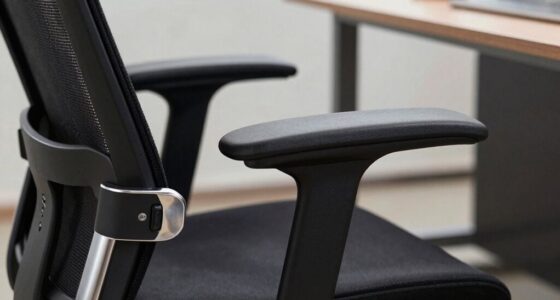
Adjustable height ensures your feet are flat on the floor and knees at a 90-degree angle, reducing strain. Lumbar support maintains the natural inward curve of your lower back, preventing slouching that can lead to disc compression or chronic pain. Seat depth adjustment allows you to sit with your back against the support while leaving a small gap between the seat and your knees, promoting circulation. Armrest positioning helps keep your shoulders relaxed, reducing tension in your neck and upper back. When these features are customizable, they create a personalized support system that adapts as your body and work habits evolve.
Research shows that adjustable lumbar support can reduce lower back pain by 40%. This isn’t just about comfort—it’s about preventing long-term health issues. A chair with multiple adjustment points might seem like a luxury, but it’s actually a smart investment. Think of it as tailoring a suit: the better it fits, the more comfortable and supportive it is over time. The tradeoff often involves a higher initial cost, but the health benefits and increased productivity can outweigh this expense. Ultimately, an ergonomic chair isn’t just a seat; it’s a dynamic tool that promotes well-being, especially during long work hours.
ergonomic office chair with adjustable lumbar support
As an affiliate, we earn on qualifying purchases.
As an affiliate, we earn on qualifying purchases.
The Latest Tech and Trends in Ergonomic Chairs
Modern ergonomic chairs have evolved from simple adjustable seats to sophisticated systems that actively promote health and well-being. For instance, smart features such as sensors that monitor your posture and remind you to move are now common. These tools are vital because static sitting positions can cause muscle stiffness, reduced circulation, and fatigue over time. By integrating technology, chairs encourage micro-movements that mimic natural shifts in posture, which are essential for maintaining musculoskeletal health.
Innovations like dynamic lumbar support move with your back, providing continuous, adaptive support that adjusts automatically as you change positions. This reduces the need for manual adjustments and ensures consistent support, which is critical for preventing strain. Additionally, eco-friendly materials—such as recycled plastics and sustainable fabrics—are becoming standard, reflecting a growing awareness of environmental impact. These sustainable choices do not compromise comfort but instead align ergonomic benefits with ecological responsibility.
Imagine a chair that not only supports your back but also encourages movement throughout the day. Some models feature wobble or balance mechanisms, turning sitting into a subtle workout that engages your core muscles and prevents the stiffness associated with prolonged static postures. Industry reports indicate that the ergonomic office chair market has grown by over 7% annually since 2018, driven by increased awareness of health, remote work, and sustainability. These trends highlight a shift toward smarter, healthier, and more environmentally conscious seating solutions that support long-term well-being and productivity.
best ergonomic office chair for back pain
As an affiliate, we earn on qualifying purchases.
As an affiliate, we earn on qualifying purchases.
How to Pick an Ergonomic Chair That Fits Your Body & Budget
Choosing the right ergonomic office chair involves a nuanced understanding of your unique needs, your work environment, and your financial considerations. It’s not just about grabbing the most adjustable or the most expensive model; it’s about finding a balance that offers optimal support without unnecessary features that you won’t use. The goal is to select a chair that promotes proper posture, reduces fatigue, and fits within your budget while offering room for future adjustments as your needs evolve.
Start by assessing your needs. For example, if you spend most of your day at a desk with limited movement, prioritize features like lumbar support and seat depth that prevent slouching and improve circulation. If you work in a warmer climate or prefer a lighter feel, breathable fabrics and mesh surfaces might be more suitable. Next, set your budget. Quality ergonomic chairs range from $200 to over $1,000. Recognize that higher prices often reflect more durable materials, greater adjustability, and better support. However, don’t assume that a higher price guarantees the perfect fit—consider your specific requirements and how well the features align with your body.
When testing chairs, spend at least 5-10 minutes seated in each to evaluate comfort and support. Pay attention to how easily you can adjust the height, lumbar support, and armrests. Remember, a chair that feels comfortable initially but lacks adjustability may cause discomfort later as your body or work habits change. Finally, read reviews from other users to gauge durability and long-term support, which are critical for making a wise investment. Tailoring your selection to your body type and work style ensures sustained ergonomic benefits and prevents costly health issues down the line.
office chair with adjustable armrests and seat height
As an affiliate, we earn on qualifying purchases.
As an affiliate, we earn on qualifying purchases.
Compare Top Ergonomic Chairs Side-by-Side
| Feature | Herman Miller Aeron | Steelcase Leap | Haworth Zody |
|---|---|---|---|
| Price Range | $1,200+ | $1,000-$1,300 | $700-$900 |
| Adjustability | High: lumbar, armrests, tilt | Very high: lumbar, headrest, armrests, tilt | Moderate: lumbar, armrests, tilt |
| Materials | Recycled mesh, eco-friendly | Polymer, fabric options | Sustainable fabric, recycled plastics |
| Special Features | Breathable mesh, lightweight | Active sitting, adjustable headrest | Eco-conscious design, adjustable lumbar |
Each of these chairs offers a different mix of support, adjustability, and price. The Aeron is iconic for its mesh design, providing excellent breathability and a modern aesthetic that promotes airflow, which is essential for long hours in warm environments. The Steelcase Leap stands out for its extensive customization options, allowing users to fine-tune support in multiple areas, which can be a game-changer for those with specific needs or discomforts. The Haworth Zody offers a more affordable yet eco-conscious alternative, emphasizing sustainable materials and a balanced support system. Understanding these differences helps you prioritize what matters most—whether it’s support, breathability, adjustability, or environmental impact—making your decision more informed and aligned with your personal health goals.
smart ergonomic office chair with sensors
As an affiliate, we earn on qualifying purchases.
As an affiliate, we earn on qualifying purchases.
Simple Tips to Keep Your Ergonomic Chair Supporting You Long-Term
- Adjust regularly: Your body and work habits change over time, so revisiting your chair’s settings periodically ensures continued support. Small adjustments can prevent the development of discomfort or stiffness, especially if you notice postural shifts or new pain points.
- Take breaks: Sitting for extended periods can cause muscle fatigue and circulation issues. Standing, stretching, or walking every 30 minutes encourages blood flow and relieves static pressure, which is vital for maintaining long-term comfort and health.
- Clean and inspect: Dust accumulation and loose parts can compromise support and durability. Regularly cleaning your chair and checking for wear or damage prevents sudden failures and extends its lifespan, ensuring sustained ergonomic benefits.
- Use accessories: Lumbar pillows, footrests, or seat cushions can provide additional support tailored to your needs. These accessories are especially helpful if your chair lacks certain adjustments or if you have specific health concerns.
- Listen to your body: Persistent pain, numbness, or stiffness are signs that your setup needs reassessment. Ignoring these signals can lead to long-term health issues, so be proactive in making adjustments or seeking professional advice when needed.
For example, a remote worker noticed that her lower back pain worsened after months of unchanged settings. By adding a lumbar cushion and adjusting her seat height, she found relief and improved posture. Small, consistent changes like these can significantly enhance ergonomic support and prevent costly health problems down the line.
Why Ignoring Ergonomics Could Cost More Than You Think
Skipping ergonomic support isn’t just a matter of discomfort—it has serious health implications that can accumulate silently over time. Poor posture from an unsupportive chair leads to muscle strain, joint misalignment, and increased fatigue. These issues often manifest as headaches, stiff shoulders, and chronic back pain, which can diminish your quality of life and work efficiency. The long-term implications are even more concerning: untreated musculoskeletal problems can develop into degenerative conditions that require costly medical interventions.
Investing in an ergonomic chair is a proactive health decision. It acts as a foundation for your daily work routine, helping to maintain proper alignment, reduce strain, and prevent injury. The cost of neglect—both financially and in terms of well-being—can be substantial. Studies indicate that musculoskeletal disorders cost employers billions annually in healthcare and lost productivity. For individuals, untreated discomfort can lead to increased absenteeism, decreased focus, and reduced overall quality of life.
For example, Sarah’s experience shows the tangible benefits of proper ergonomic support. Spending hours daily in a chair without adequate support caused her persistent lower back pain and reduced concentration. After switching to a model with adjustable lumbar support and better ergonomics, her discomfort decreased by 70%, and her productivity improved markedly. This illustrates how the right investment in ergonomic support can yield significant health and economic benefits, making it a wise choice for long-term wellness.
Frequently Asked Questions
How do I know if my chair provides enough lumbar support?
Sit back and check if the support naturally fits the curve of your lower back. If it feels like a gentle hug without pressing too hard, it’s a good fit. Adjustable lumbar support allows you to fine-tune this comfort.Are expensive ergonomic chairs worth the extra cost?
Yes, especially if you spend many hours sitting daily. Higher-end models often offer better adjustability, durability, and support, reducing discomfort and long-term health risks. But even a mid-range chair with proper adjustments can do a great job.How often should I replace my ergonomic chair?
Most good chairs last about 5-8 years with proper maintenance. If you notice loose parts, fabric wear, or discomfort despite adjustments, it’s time for a replacement.Can I use a regular chair for ergonomics?
You can, but it’s unlikely to offer the same level of support. Investing in an ergonomic chair with adjustable features ensures your body is well-supported during long hours.Conclusion
A good ergonomic office chair isn’t just about luxury—it’s about taking control of your comfort and health. Think of it as the foundation of your workspace. When supported well, your body can focus on the task, not the ache. So, choose wisely, adjust often, and sit smarter every day.Fall Picks
fall essentials
As an affiliate, we earn on qualifying purchases.