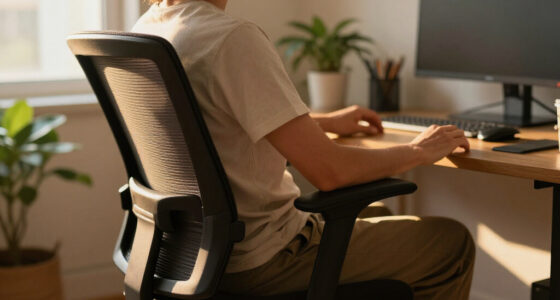

Choose and set up an ergonomic office chair that fits your body and desk, with your feet supported and your back comfortably supported. This guide is for anyone buying a chair or adjusting one they already own; no specialist knowledge is needed. Allow 30-60 minutes to compare chair features, adjust the seat and back, and check the fit at your workstation.

Get comfort and recovery gear delivered free with Prime
- Fast, free delivery on millions of items
- Prime Video, Amazon Music and more included
- Member-only deals all year

TRALT Ergonomic Office Chair with Adjustable Lumbar Support, Black
- ✔ Brand: TRALT
- ✔ Color: Black
- ✔ Seat width: 19.7 in

TRALT Ergonomic Office Chair with Adjustable Lumbar Support, Headrest, and Flip-Up Armrests
- ✔ Brand: TRALT
- ✔ Color: White
- ✔ Seat width: 19.7 in

BestOffice Ergonomic Mid-Back Office Chair, Black
- ✔ Brand: BestOffice
- ✔ Model: VN-H03-BLACK
- ✔ Color: Dark black
Difficulty: Beginner | Time: 30-60 minutes
What You’ll Need
Tools & Materials:
- Your desk and usual computer setup
- A tape measure or ruler
- The chair’s adjustment and assembly instructions, if available
Knowledge:
- Basic familiarity with your desk and the tasks you do while seated
Wear your usual work shoes and bring any footrest, cushion, or other support you already use. If you are shopping, compare chairs using your own desk measurements and return policy; a chair’s label alone cannot confirm that it fits you.
TRALT Ergonomic Office Chair with Adjustable Lumbar Support, Black
This TRALT is our most balanced choice for shoppers who want meaningful lower-back adjustment without adding a headrest or flip-up arm mechanism. Its lumbar support adjusts in depth, giving us more ability to position the support than the fixed lumbar description on the BestOffice chair. The stated 19.7-inch seat width and 17.3-inch depth also make the fit easier to assess before buying, although individual body proportions still matter.Compared with the headrest-equipped TRALT, this version keeps the feature set focused on the seat, mesh back, and lumbar adjustment. That may suit buyers who sit upright at a desk and do not need added recline support. Its height range extends to 21.7 inches, higher than BestOffice’s 20.3-inch maximum, which may help some taller desk setups. The 330-pound stated capacity also exceeds BestOffice’s 250 pounds, but it should not be treated as evidence that the chair will fit every user equally well.The tradeoff is uncertainty around long-term support: the supplied details list no manufacturer warranty. Assembly is required, and a molded foam seat can feel different from one person’s preferred cushion. We would choose it for adjustable lumbar placement and clearly stated seat dimensions, while checking the measurements against our own desk and posture needs.
Pros:
- Lumbar support adjusts in depth.
- Seat dimensions are specified at 19.7 by 17.3 inches.
- Stated capacity is 330 pounds.
- Breathable mesh back and smooth-rolling 360-degree casters.
Cons:
- Manufacturer warranty is listed as none.
- Assembly is required.
- No headrest or flip-up armrests are listed.
Best for: Desk workers who want adjustable lumbar depth, a defined seat size, and a higher stated weight capacity without a headrest.
Not ideal for: Buyers who need a stated manufacturer warranty, a headrest, or independently verified guidance on fit and comfort.
Bottom line: We rank this TRALT first for its focused lumbar adjustability and clearer fit specifications, provided the missing warranty is acceptable.
“We rank this TRALT first for its focused lumbar adjustability and clearer fit specifications, provided the missing warranty is acceptable.”
TRALT Ergonomic Office Chair with Adjustable Lumbar Support, Headrest, and Flip-Up Armrests
Choose this TRALT when a headrest and flexible armrests are central to how we use a desk chair. It retains the other TRALT’s adjustable lumbar support, 19.7-inch-wide seat, 17.3-inch depth, and 330-pound stated capacity, then adds an adjustable headrest and backrest. That makes it the more configurable of the two TRALT options, especially for buyers who shift between upright work and a reclined position.The two listed reclining positions and flip-up armrests give it a distinct role in this lineup. Raising the arms can make it easier to slide the chair beneath a desk or clear space when the chair is not in use; the headrest may be useful when reclining. By contrast, the standard TRALT is the more straightforward choice if we primarily need seat and lumbar fit. The added controls do not automatically make this model more ergonomic: a headrest can be unnecessary for upright typing, and buyers should confirm that the adjustment range suits their body.Like its simpler sibling, this chair requires assembly and has no manufacturer warranty listed. The white finish also makes it visually distinct, but the supplied details do not establish how it will hold up to wear. We place it second because it offers the broadest adjustment set here, while its extra parts and recline features make sense for a narrower set of working habits.
Pros:
- Adjustable lumbar support, headrest, backrest, and seat height.
- Flip-up armrests can help clear desk or storage space.
- Two reclining positions are listed.
- Stated capacity of 330 pounds and breathable mesh back.
Cons:
- Manufacturer warranty is listed as none.
- Assembly is required.
- Extra adjustments add complexity for buyers who only need basic desk seating.
Best for: Buyers who recline during breaks or tasks and want a headrest, adjustable backrest, lumbar support, and arms that can flip up.
Not ideal for: People who prefer a simple upright chair, do not need a headrest, or want a listed manufacturer warranty.
Bottom line: We recommend this version over the standard TRALT when the headrest, recline positions, and flip-up arms match our daily routine.
“We recommend this version over the standard TRALT when the headrest, recline positions, and flip-up arms match our daily routine.”
BestOffice Ergonomic Mid-Back Office Chair, Black
BestOffice is the straightforward option for buyers who want a mesh-backed chair with basic controls. Its mid-back design and lumbar support cover the core of an everyday desk setup, while height adjustment and a tilt-tension knob let us make a couple of useful seating changes. The ventilated back helps distinguish it from a fully upholstered design, although both TRALT models also use breathable mesh.Compared with the standard TRALT, BestOffice offers less detail about seat fit: its height range is listed, but seat width and depth are not. It also has a 250-pound stated capacity, below the 330-pound figures for both TRALT chairs. In return, it avoids the additional headrest and recline options found on the feature-rich TRALT, and its included hardware and instructions come with an estimated 10–15-minute assembly time. That estimate is a product claim, not a guarantee for every setup.This chair is best viewed as a simple mid-back pick, not the most adjustable option in the group. Its armrests are described as ergonomic, but the supplied specs do not say they adjust, so buyers who need to tune arm position should look more closely at their requirements. Upper-back coverage is also limited relative to a high-back chair. We rank it third because its controls and fit information are less extensive, while its simpler design may be enough for a buyer seeking basic height and tilt adjustment.
Pros:
- Ventilated mesh back with lumbar support.
- Seat height adjusts from 17.1 to 20.3 inches.
- Tilt-tension knob and 360-degree swivel base.
- Assembly hardware and instructions are included.
Cons:
- Stated capacity is 250 pounds, lower than either TRALT chair.
- Mid-back design provides less upper-back coverage.
- Seat width and depth are not specified.
Best for: Buyers seeking a basic mid-back mesh chair with height and tilt-tension controls for an indoor workspace.
Not ideal for: People who need a higher stated capacity, precise seat-dimension information, upper-back coverage, or adjustable lumbar depth.
Bottom line: We would choose BestOffice for basic height and tilt controls, but buyers needing detailed fit adjustments should favor a TRALT model.
“We would choose BestOffice for basic height and tilt controls, but buyers needing detailed fit adjustments should favor a TRALT model.”
As an Amazon Associate we earn from qualifying purchases.
Before You Start
Set up the chair where you normally work, on a stable floor. Keep the desk, keyboard, mouse, and monitor in their usual positions so you can judge the whole workstation. Do not force a lever or adjustment that sticks; check the manual or ask the seller for help. A chair can improve support, but it cannot diagnose or treat ongoing pain.
Step-by-Step Instructions
Step 1: Measure your desk and workspace
Measure the distance from the floor to the underside of your desk, and note whether the desk has a drawer or support bar that limits legroom. Check the space available for the chair to roll and recline. If you are choosing a chair, compare its seat-height range and dimensions with those measurements before buying.
Tip:Check the seat depth and width as well as the height. A chair may fit beneath the desk but still be too deep or narrow for comfortable sitting.
Check: You have recorded the desk clearance and know whether a candidate chair can fit under the desk with room for your legs.
Step 2: Choose a chair with adjustable support
Select a chair whose seat height can place your feet flat on the floor or on a footrest. Look for a seat-depth adjustment or a seat that leaves a small gap behind your knees, plus back support that can be positioned to meet the curve of your lower back. Check that the backrest, armrests, and recline can be adjusted to suit your tasks.
Tip:Try the chair for several minutes if you can. Look for stable support and comfortable movement, not a particular brand or a long feature list.
Check: The chair supports your feet, thighs, and back in a relaxed position and allows you to reach your work without leaning forward.
Step 3: Set the seat height
Sit with your back against the backrest and adjust the seat until your feet rest flat on the floor. Keep your knees roughly level with your hips or slightly lower, and let your thighs rest without pressure at the front of the seat. If your feet do not reach the floor at a comfortable desk height, use a stable footrest.
Tip:Do not raise the seat just to reach the desk if that leaves your feet hanging. Support your feet first, then check that your thighs and knees remain comfortable.
Check: Your feet are supported, your thighs are not compressed by the seat edge, and your knees can bend comfortably.
Step 4: Adjust the seat depth
Move the seat pan forward or backward, if the chair allows it, so your back can stay against the backrest while you sit. Leave a small space—about two to three finger widths—between the front edge of the seat and the backs of your knees. If the seat is fixed, check whether it leaves enough space for this position.
Tip:A seat that is too deep can press behind your knees or make you slide forward. A seat that is too short may leave too little support under your thighs.
Check: You can sit back fully without the seat pressing into your knees, and most of your thighs have comfortable support.
Step 5: Position the backrest and lumbar support
Adjust the backrest so it supports your back while you sit upright in a relaxed position. Move the lumbar support, if present, until it meets the inward curve of your lower back without pushing you forward. Set the backrest angle so you can lean back comfortably and still see your screen without craning your neck.
Tip:Support should feel steady, not like a hard point pressing into your spine. If the chair has tension control, adjust it so the backrest moves when you lean but does not push you forward.
Check: Your lower back contacts the support, your shoulders can relax, and you can sit back without slouching or being forced into an arch.
Step 6: Set the armrests and work surface
Adjust the armrests so your shoulders stay relaxed and your elbows rest near your sides. Move or lower them if they hit the desk or prevent you from sitting close enough to the keyboard. Keep the keyboard and mouse within easy reach, with your forearms relaxed and wrists in a comfortable, mostly straight position.
Tip:Armrests should support your arms lightly. If they lift your shoulders or make you reach outward, lower them or move them out of the way.
Check: You can type and use the mouse with relaxed shoulders, without leaning toward the desk or holding your arms up.
Step 7: Check the full workstation
Sit in your adjusted chair and use your computer as you normally would. Keep your feet supported, your back in contact with the backrest, and your screen at a height that lets your head remain level. Make small changes to the chair or desk setup if you need to reach, twist, or lean forward.
Tip:Do not expect one posture to feel right all day. Stand, stretch, or change position regularly, and use the chair’s recline if it allows comfortable movement.
Check: You can work at the screen with supported feet and back, relaxed shoulders, and no need to perch on the seat edge.
Common Mistakes to Avoid
- Keeping a fixed posture for long stretches. — Change position and take brief movement breaks throughout the day, even when the chair feels comfortable.
Troubleshooting
Problem: The armrests stop you from moving close to the desk.
Solution: Lower or reposition the armrests, or move them aside if the design permits. Keep the keyboard close enough that you do not have to reach forward.
What Success Looks Like
Your chair lets you sit with your feet supported, thighs comfortably resting on the seat, a small gap behind your knees, and your lower back against the backrest. Your shoulders remain relaxed while you reach the keyboard and mouse, and you can look at the screen without leaning forward or craning your neck. Recheck the fit after using the chair for a short work session; the adjustments should remain comfortable rather than create new pressure or pain.
Next Steps
Use the chair for a few work sessions and adjust one setting at a time if discomfort appears. Keep the chair’s adjustment instructions, check its fasteners and moving parts as the manufacturer recommends, and take regular movement breaks. If discomfort persists or worsens despite changing your setup, seek advice from a qualified health professional.
Frequently Asked Questions
How high should an ergonomic office chair be?
Set it so your feet rest flat on the floor or a footrest, with your knees roughly level with your hips or slightly lower. Your thighs should feel supported without pressure behind the knees.
Should my lower back touch the chair?
Yes. Adjust the backrest so it supports your lower back while you sit back in the seat. The support should feel comfortable and steady rather than forcing your back into an arch.
Do I need a footrest?
Use one if you cannot keep your feet supported after setting the chair at a comfortable height for your desk. Choose a stable footrest that does not slide away.
How often should I change my sitting position?
Change positions regularly and take brief movement breaks during the day. A well-adjusted chair supports comfortable sitting, but staying still for long periods can still cause stiffness.