
TL;DR

Get comfort and recovery gear delivered free — and shop member deals
- Fast, free delivery on millions of items
- Access to Prime Big Deal Days deals on October 6–7
- Prime Video, Amazon Music and more included
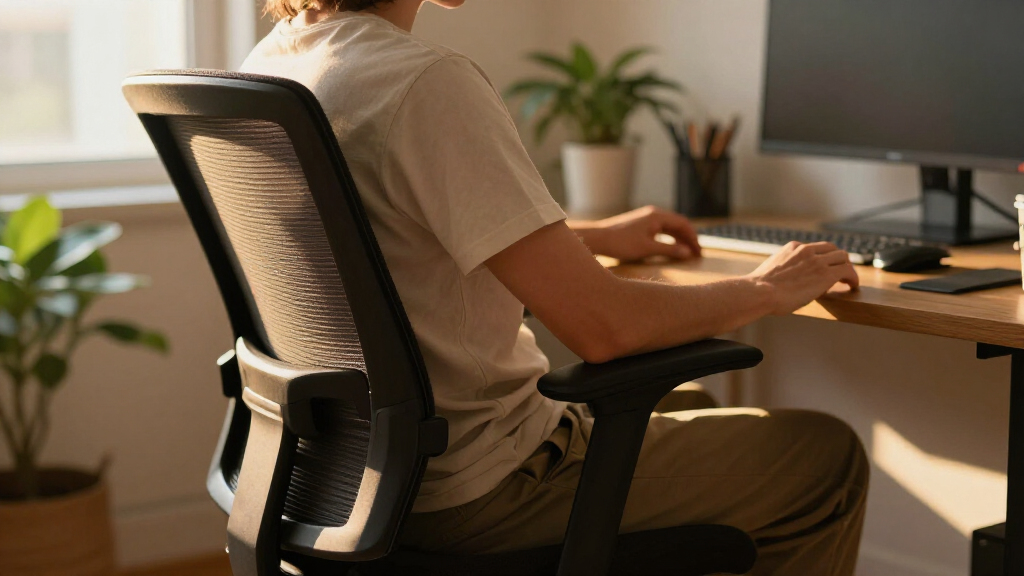
An ergonomic office chair supports comfortable working by fitting your body and allowing useful adjustments, such as seat height, seat depth, back support, and armrests. Set the chair to suit your desk, keep your feet supported, and change positions through the day; no chair can guarantee comfort or make up for a poorly arranged workstation.
By midafternoon, a chair that felt fine at 9 a.m. can leave your shoulders creeping toward your ears and your legs searching for room. That discomfort may come from the chair’s fit, its settings, or the desk around it.
This guide explains what an ergonomic office chair can do, which adjustments matter most, and how to check whether a chair suits your body and workspace. You’ll also get a simple setup sequence and a practical checklist for shopping.
Choose a chair for its fit and usable adjustment range, not its feature count or ergonomic label.
Set seat height first, then check seat depth, back support, armrests, and desk position.
Leave a small gap behind your knees while the seat supports most of your thighs.
Use a footrest if your feet do not reach the floor at the desk height that works for you.
Check desk clearance, return terms, warranty, and replacement parts before buying.
What an Ergonomic Office Chair Can—and Can’t—Do
An ergonomic office chair is designed to support a comfortable working posture and let you adjust the seat and back to suit your body and tasks. Its value is practical: when the chair supports you where you need it, you can spend less effort holding yourself in place and more attention on your work. But the label alone does not promise comfort or suitability. Fit, setup, movement, and the rest of your workstation all matter.
Think of the chair as one instrument in a small work orchestra. If your monitor sits too low or your mouse is too far away, a well-made chair cannot fix the whole arrangement. For example, if you lean forward to read a laptop on a low coffee table, the chair may be doing its job while the setup keeps pulling you out of a comfortable position. This is why a chair should be assessed at the desk where you will use it: a feature that feels helpful in a showroom may not solve the constraint that causes you to reach, twist, or hunch at home.
There is no single posture you need to hold all day. A chair that lets you recline and shift positions can suit long work sessions better than one that locks you rigidly upright, because changing position spreads the demands of sitting rather than asking one posture to feel good indefinitely. Comfort is more like finding a steady walking pace than striking one perfect pose. A supportive chair makes those changes easier; it does not remove the need to move.
Check These 6 Fit Points Before You Buy
Before buying an ergonomic office chair, check that its seat, back, and adjustment range suit your body and fit your desk. The useful question is not how many controls the chair has, but whether you can use those controls to get comfortable support. Adjustment range matters because the same fixed dimensions can leave one person unsupported and another pressed against an edge. A tall person and a shorter person may need different seat depths and heights even if they do the same job.
- Seat height: Your feet should rest flat on the floor or a footrest, with your knees roughly level with or slightly below your hips. This helps you avoid having to brace your feet or let them dangle. Check the range against your desk too: if you lower the chair to reach the floor but then crowd your legs beneath the tabletop, the desk and chair heights may not work well together.
- Seat depth: The seat should support most of your thighs while leaving a small gap behind your knees. Too little depth can leave your thighs with less support; too much can press behind your knees or tempt you to slide forward away from the backrest. This dimension is especially useful to check in person, since a chair can have many other adjustments yet still be too long for your legs.
- Seat width: You should have room to sit without the seat pressing into your hips. A seat that is too narrow can restrict comfortable movement, while an unnecessarily wide seat may make armrests harder to position comfortably. Check the usable seating area, not just the chair’s overall width.
- Back support: The backrest should support your lower back comfortably. A pronounced lumbar curve can feel helpful to one person and pushy to another. The aim is support you can settle against, not a shape that forces you to hold still or continually move away from pressure.
- Armrests: They should let your shoulders relax and allow the chair to move close enough to your desk. Armrests that are too high can lift your shoulders; ones that are too wide or fixed can keep you from getting close to the work surface. That clearance affects how far you reach for the keyboard, so consider the desk and chair together.
- Recline and materials: Check whether you can change position easily, and whether mesh or padded upholstery feels comfortable for the room and your workday. Recline that is easy to adjust may make varied positions more practical, while materials affect temperature, firmness, and care. These are personal tradeoffs: a cooler feel or softer first impression does not necessarily mean the chair will remain comfortable through a long session.
For example, imagine choosing a chair online because it has ten adjustment controls, then finding the seat is still too long for your legs. More adjustability helps only when the range matches your body and the controls make sense to you. If you cannot test the chair, compare its dimensions with a chair that already fits and check the return terms before relying on a product description.
Set Your Chair Up in Five Simple Steps
To adjust an ergonomic office chair, start with seat height, then fit the seat depth and backrest before setting your armrests. Work in that order so each change gives you a stable base for the next one: foot support affects how you sit, and seat depth affects whether you can use the backrest without pressure behind your knees. Try the adjustments at your actual desk, since your keyboard and work surface affect how the chair feels.
- Set the height: Sit back and adjust the seat until your feet rest flat on the floor. If the desk is high and your feet dangle, add a footrest rather than losing comfortable desk height. The goal is to support your feet while keeping enough room under the desk and a workable relationship to the keyboard.
- Check the seat depth: Sit with your back against the backrest. Leave a small gap behind your knees; the edge should not press into them. If the chair has a depth control, use it to find support across most of your thighs without making you slide forward to escape the edge.
- Position the backrest: Adjust its angle or recline tension until you feel comfortable support while sitting back. Keep adjusting if the lumbar curve feels too strong or too low. A backrest that supports you comfortably can make it easier to vary your position; one that pushes in the wrong place may lead you to avoid leaning back.
- Lower your shoulders: Set the armrests so your shoulders can relax and your elbows have support. Make sure the armrests do not stop you from getting close to the desk. If they force you to reach forward, lower or reposition them if possible; otherwise, they may be a poor match for that desk.
- Check the whole setup: Place your keyboard and mouse within easy reach and bring your screen to a comfortable viewing position. Try a few working positions rather than testing one pose. If you notice yourself repeatedly leaning or stretching, look for what in the setup is drawing you there before making another chair adjustment.
Take Maya, who works at a dining table that sits higher than her usual desk. Raising her chair gives her comfortable access to the table, but her feet no longer reach the floor. A footrest supports her feet while she keeps the desk height that works for her. That small addition resolves one mismatch in the setup without forcing her to choose between supported feet and comfortable access to the table.
Choose Mesh or Padding for Your Actual Workday
Mesh and padded chairs can both work well; the better choice depends on what feels comfortable to you, how warm your workspace gets, and how you care for the chair. Mesh can feel cooler and has a different kind of support from cushioning. Padded upholstery can feel softer at first, though comfort, firmness, breathability, and cleaning vary from model to model. These differences affect daily use more than a material label does: a chair that runs cool may be welcome in a warm room, while a particular mesh tension may not feel as comfortable to you as a cushioned seat.
Picture a warm upstairs home office where the afternoon sun falls across the desk: breathable mesh may feel more comfortable there. In a cool room, a padded seat may feel inviting when you first sit down. Try a chair if possible, and pay attention to how the seat feels after more than a quick showroom test. A brief sit can reveal immediate pressure or firmness, but a longer trial is more useful for judging whether the support and temperature suit your workday.
Trends such as recycled materials and repairable parts may also affect your choice. Some newer chairs add posture reminders, sensors, or app connections, but those features do not replace good fit and there is limited evidence that they improve health outcomes. Consider them optional conveniences: they may suit someone who likes prompts or tracking, but they add little if the chair’s basic dimensions are wrong or the reminders interrupt work. A simple chair that adjusts comfortably may suit you better than a smart one you rarely use.
Make Your Desk, Chair, and Movement Work Together
Your ergonomic office chair works best as part of a setup that lets you reach your screen, keyboard, and mouse without repeatedly leaning or stretching. Check that the chair’s seat height works with the desk, the armrests clear the tabletop, and the chair fits beneath it when you want to move closer. These details influence each other: for example, a desk that forces you to sit too low can make your shoulders rise toward the keyboard, while armrests that block the desk can leave you reaching forward. A chair cannot compensate for a monitor or keyboard placed awkwardly.
For instance, a person using a standing desk may sit comfortably at one height but hunch when the desk rises and the keyboard stays too high. Adjust the desk and chair as a pair, and check your shoulder and arm position both sitting and standing. If your feet do not reach the floor at the right desk height, a footrest can help. Looking at both positions matters because a setting that works while seated does not automatically work when the desk rises.
Let movement be part of the day. Shift your position, stand when it suits your work, and take breaks rather than trying to hold a single posture for hours. Changing position gives different parts of your body a break from sustained pressure, though it does not make a poorly fitting chair or awkward desk arrangement comfortable by itself. The best chair can support a comfortable session, but it does not need to turn sitting into a motionless sport.
Spend on Fit, Build Quality, and the Return Policy
Before spending more on an ergonomic office chair, check fit, build quality, warranty, return terms, and replacement parts alongside the feature list. A high price does not prove that a chair suits you, and a feature-packed model may still have the wrong dimensions. The practical value of a chair depends on whether it remains useful after daily adjustment and wear: a strong warranty or available replacement parts may help extend its service, while a generous return window lets you find out whether the fit works at home. Look for a clear way to try it, return it, or adjust it if the fit is off.
Imagine ordering a chair for a small home office and discovering that its wide armrests prevent it from sliding beneath the desk. Measure the space first, including the distance between desk legs and the tabletop height. Then check the chair’s seat height, width, and armrest clearance against those measurements. This can prevent spending extra on features that do not matter if the chair cannot fit the workspace.
People who are short, tall, have limited mobility, or have particular comfort needs may need a more tailored fit. If you have persistent pain or a specific medical concern, a qualified professional can offer advice for your situation. An ergonomic label is not a personal fitting session, and a chair that suits a general range of users may still need adjustments or a different configuration to work for you.
Frequently Asked Questions
What makes an office chair ergonomic?
An ergonomic office chair is designed to support comfortable working and let you adjust it to your body and tasks. Useful features can include adjustable seat height, backrest angle, recline tension, armrests, or seat depth. The chair still needs to fit you and work with your desk.
How do I know if an office chair seat is too deep?
Sit back against the backrest and check the space behind your knees. The seat should support most of your thighs while leaving a small gap; if its edge presses into the backs of your knees, it may be too deep for you.
Is adjustable lumbar support necessary?
Adjustable lumbar support can help you place the backrest’s support where it feels comfortable, but it is not right for everyone. Try the chair if you can, since a pronounced curve may feel supportive to one person and uncomfortable to another.
Can an ergonomic chair help with back pain?
A well-fitting chair may support a more comfortable work setup, but it cannot guarantee pain relief or treat a medical condition. Desk position, movement, and individual needs also matter. If pain persists or you have a specific medical concern, ask a qualified professional for guidance.
Do I need a footrest with my office chair?
A footrest can help if your chair needs to sit high enough for the desk but your feet do not reach the floor. Adjust the chair first, then use a footrest to support your feet while keeping your knees roughly level with or slightly below your hips.
Conclusion
Choose a chair that fits your body, adjust it to your desk, and let yourself move through the workday. Start with seat height and depth; those small measurements can turn a chair from a place you endure into a place where work feels easier to settle into.
Fall Picks
fall essentials
As an affiliate, we earn on qualifying purchases.