Ergonomic Office Chairs: A Black Friday Guide
AIThis post was created with the assistance of artificial intelligence (AI).

TL;DR

An ergonomic office chair is designed to support comfortable, adjustable sitting during desk work, but comfort depends on fit, adjustment, movement and the whole workstation. Check seat height and depth, lower-back comfort, armrest fit, materials and return terms before buying; no chair guarantees pain relief or replaces breaks and position changes.

The chair that feels perfect in a showroom can feel like a wooden perch by 3 p.m. at your own desk. Fit changes with your height, desk, tasks and the way you like to move, so a long list of adjustments alone cannot tell you whether a chair will work for you. An ergonomic office chair is designed to support comfortable, adjustable sitting during desk work. In this guide, you’ll learn which adjustments matter, how to test a chair at home, and what to check before spending your money. You’ll also see why a chair can support comfort without promising to fix back or neck pain. Think of your chair as one piece of a work setup, like a good pair of shoes on a long walk. It can make the day more comfortable, but the fit of the rest of your setup and the time you spend moving still count.
At a glance
Ergonomic Office Chairs: Fit, Features and Buying Tips
Key insight
A useful chair fit check looks at four things together: supported feet, relaxed shoulders, elbows near desk height and a comfortable backrest; screen and input-device placement matter too, because th…
Key takeaways
1

Set seat height so your feet rest on the floor or a footrest, with knees roughly level with or slightly below your hips.

2

Look for a small gap behind your knees when you sit back; adjust seat depth if the edge presses into your legs.

3

Position lumbar support and armrests for comfort, and check that the armrests let the chair move close to your desk.

4

Measure desk clearance, chair dimensions and floor needs before buying; review the trial, return, warranty and parts terms.

5

Use the chair to support comfortable position changes, and seek professional advice for persistent or severe pain.

Step by step
1
Adjust These Four Things Before You Judge the Fit
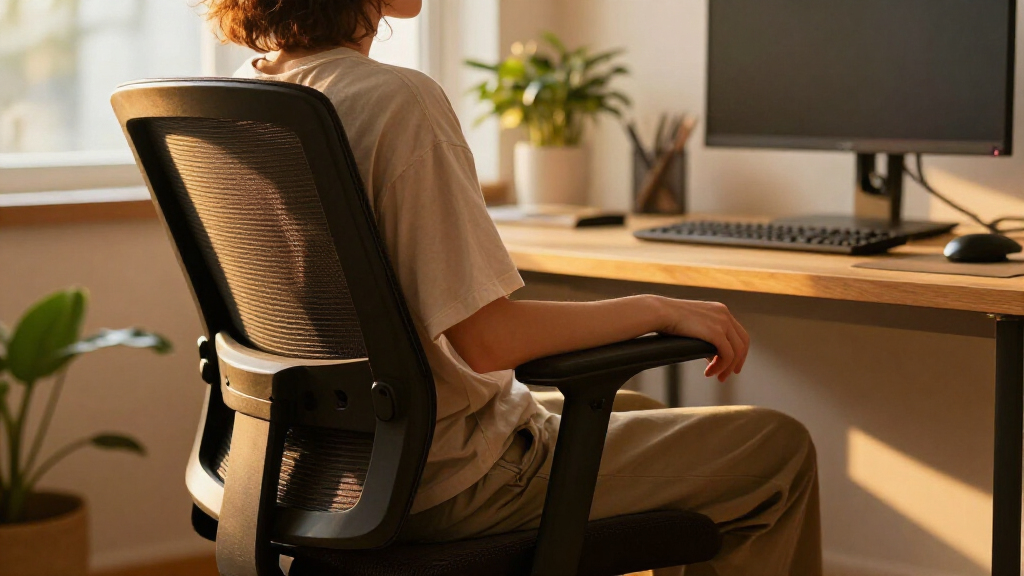
A practical starting fit has **supported feet**, **relaxed shoulders**, elbows near desk height and a backrest that feels comfortable.
Before you orderOffer from Amazon

Get comfort and recovery gear delivered free with Prime

  • Fast, free delivery on millions of items
  • Prime Video, Amazon Music and more included
  • Member-only deals all year
Start your free Prime trial Free trial for eligible customers · Cancel anytime
As an affiliate, we earn on qualifying purchases.

What an Ergonomic Office Chair Can—and Can’t—Do for You

An ergonomic office chair is designed to support comfortable, adjustable sitting during desk work by letting you fit key parts of the chair to your body and tasks. “Ergonomic” describes a design aim, not a guarantee of good posture, pain relief or a healthier back. A chair can make it easier to sit comfortably, but it can’t make staying still for hours a good plan. For example, imagine you spend Tuesday answering emails, then switch to a two-hour video call. You may want the seat and backrest to support upright typing, then recline a little during the call. A chair that lets you make those changes can feel more accommodating than a fixed stool. But if your screen sits too low, you may still crane your neck to read it. There is no single “perfect posture” that works for every body all day. A comfortable, supported position is a useful starting point, and changing positions adds flexibility. If your backrest presses hard into your lower back or forces you into a stiff pose, more support is not automatically better; adjust it or try another fit. Think of ergonomic features as useful controls, like the dials on a desk lamp. They help when you set them to suit the room and the task. A chair may support comfort, but persistent or severe pain deserves advice from a qualified health professional rather than a promise from a product label.

Products Worth Considering

Philips Hue Smart Light Starter Kit with Bridge and 4 White and Color A19 Bulbs

Philips Hue Smart Light Starter Kit with Bridge and 4 White and Color A19 Bulbs

Philips Hue Festavia Permanent Outdoor String Lights, 80 Lights, 150 ft

Philips Hue Festavia Permanent Outdoor String Lights, 80 Lights, 150 ft

As an affiliate, we earn on qualifying purchases.

Adjust These Four Things Before You Judge the Fit

A practical starting fit has **supported feet**, **relaxed shoulders**, elbows near desk height and a backrest that feels comfortable. These are starting points, not medical rules; comfort varies by person, chair and task. Taken together, the checks help reveal whether the chair and desk let you work without having to brace, reach or hold yourself in an awkward position. Take a few minutes to adjust the chair before deciding that it suits you or sending it back.
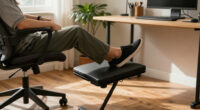
  1. Set the seat height. Sit back and adjust the seat so your feet rest on the floor or a footrest. Aim for knees roughly level with or a little below your hips. Feet that dangle leave your legs unsupported and can make it harder to settle comfortably. If lowering the chair would put your elbows too low for the desk, a footrest may preserve both foot support and a workable desk height.
  2. Check seat depth. With your back against the backrest, look for a small gap between the seat edge and the backs of your knees. A seat that presses into your legs may feel uncomfortable and make it harder to sit fully back; one that’s too short may leave less thigh support. This is why seat depth adjustment can matter as much as height, especially when several people share a chair or when a fixed seat is unusually long or short for you.
  3. Position the lower-back support. Adjust lumbar support so it feels comfortable against your lower back. Its purpose is to meet your back where it rests naturally, not push you into one rigid curve. If it creates a sharp pressure point or an exaggerated arch, ease it back; an adjustable feature only helps when its range and shape suit your body.
  4. Set the armrests. Let your shoulders drop and rest your elbows near your body. Armrests can take some effort out of holding your arms up, but if they are too high they may raise your shoulders, and if too wide they may make you reach outward. If they stop the chair from sliding close to the desk, lower them or move them out of the way.
Try the routine on a normal workday: sit down, set the chair, type for ten minutes, then notice whether you’re reaching for the keyboard or lifting your shoulders. Those habits can point to a mismatch between chair height, armrests and desk height, rather than a problem solved by adding more support. Small signs like these can tell you more than a quick showroom sit. Once the chair feels comfortable, check your monitor, keyboard and mouse too; you shouldn’t have to reach forward or crane your neck just to use them.

Compare Features by How You’ll Use the Chair

Choose chair features by how they affect your comfort, fit and daily tasks, not by the number of adjustments on the sales page. More controls can help when they give you a setting you’ll actually use, but they also add complexity and cost without guaranteeing a better fit. For a compact home office, a chair that fits under the desk may matter more than a headrest or a complex tilt system.
FeatureWhat to checkEveryday example
Seat height and depthCan you support your feet and keep a small gap behind your knees?A shorter user may need a footrest if the desk requires a high chair setting.
Lumbar supportDoes it sit comfortably against your lower back without forcing a curve?During a long spreadsheet session, comfortable support should not distract you with pressure.
ArmrestsCan you adjust them so shoulders relax, while still moving close to the desk?Wide armrests may catch on a small desk or drawer.
Seat and back materialsConsider firmness, cushioning, breathability and room temperature.A warm upstairs office may suit breathable mesh better than thick upholstery.
Recline and movementCan you change positions comfortably and control the recline?A video-call user may prefer a backrest that reclines smoothly.
Base, casters and sizeCheck floor suitability, weight capacity and clearance under your desk.Hard-floor casters or a mat may suit a timber floor better.
These features often involve tradeoffs. Mesh can feel airy, though its tension and texture may not suit everyone; cushioned fabric can feel softer, though it may feel warmer and can be harder to clean. A synchronized tilt mechanism is one design option: it may let the seat and back move together, while a simpler mechanism may be easier to adjust or cost less. Neither is a must-have. Try the chair, where possible, and use a return period to check whether its materials and controls stay comfortable over a full workday.

Fit the Chair to Your Desk and the Room

A chair can fit your body and still feel wrong if it fights your desk, screen or floor. Check the complete setup: you should be able to roll close enough to the desk, reach your keyboard and mouse without stretching, and see your screen without leaning forward. If you cannot get close to the desk, for example, you may compensate by reaching or sitting at the seat’s edge, which can erase the comfort you gained from a well-fitting backrest. Lighting and work habits also affect how comfortable the workstation feels. Say you work in a small apartment with a shallow desk and a wooden floor. Before buying, measure the opening under the desk, the available space behind you for reclining, and the distance from the desk edge to the wall. Check the chair’s width and depth, whether its armrests can tuck under the desk, and whether the casters suit the floor. These measurements matter because a chair that blocks a drawer or cannot recline in the available space may discourage the position changes its features are meant to allow. A chair that barely fits may turn every seat adjustment into a small furniture shuffle. Your desk can also change the right seat height. If you raise the chair to reach a tall desk, your feet may lose support; a footrest can help if the chair otherwise fits well. For a standing desk, consider whether you want a chair for seated periods, a stool for perching, or both. A stool may take less room, while a chair usually offers a backrest and more ways to change position. The best arrangement depends on your tasks and space, not a universal rule. Before buying, compare the chair’s dimensions with a chair you already find comfortable. Check the return policy and trial period, since the feel of a seat over several days is hard to judge from a product photo. Also review warranty coverage, replacement parts and repair options; a daily-use chair is easier to keep when you can replace a worn caster instead of the whole chair. A generous trial is particularly useful when a chair’s adjustments look suitable on paper but you need to discover whether the seat and support feel right in your own routine.

Use Movement and Small Workday Changes to Stay Comfortable

A supportive chair works best as part of a setup that lets you move and change position. No chair makes sitting still for long periods ideal, and there isn’t one perfect posture to hold all day. A recline feature can make a position change easier, while a short walk or stretch gives you a different kind of break. The point is to have options: a chair that only feels comfortable in one fixed pose may be less useful across tasks that involve typing, reading and calls. For instance, after finishing a 30-minute batch of invoices, you might stand to refill your water, then sit back down with the chair reclined slightly for a call. That small change breaks up the stretch of sitting without turning your day into a strict exercise schedule. If you find reminders useful, set one to prompt a position change or break; a reminder can nudge you, but it can’t assess what your body needs. Try linking movement to tasks you already do: stand while reading a short document, walk during a phone call when practical, or shift your position between meetings. These are options, not rules. If your work requires long periods at a screen, make the setup easy to use so you don’t have to perch at the edge of the seat to reach your keyboard. A reachable keyboard and comfortable viewing height make it more practical to vary your posture without losing your place in the task. Newer chair designs often highlight inclusive sizing, breathable materials, recycled inputs, modular parts, detailed tilt controls or app-connected reminders. These are product trends, not proof that a feature prevents pain or improves health. Judge each one by whether it solves a real problem for you: a replaceable part may matter more than an app if you want a chair that’s easier to maintain. Likewise, a wider size range may be useful if standard dimensions do not fit you, while an app reminder adds little if you already change positions naturally.

Spend on the Fit You’ll Use, Not the Biggest Feature List

A higher price does not automatically buy better comfort or health; the value depends on fit, build, service and the features you’ll use. It may make sense to pay more for a chair that fits your body, lasts through daily use and offers replacement parts. Paying extra for controls you never adjust may not add much to your workday, particularly if the chair’s basic dimensions are wrong for you. Picture two options: a modest chair that supports your feet, lets you set the seat depth and feels comfortable after an hour, and a costly model with a headrest and several tilt controls that presses into your lower back. The modest chair may be the better fit for you, even if the expensive one looks more impressive. A headrest can suit some users or tasks, but it isn’t a requirement for ordinary desk work. This comparison shows why trying the chair matters: a feature list describes what a chair can do, while your body’s response shows whether those features solve a real comfort or setup problem. Before you buy, make a short checklist: measure desk clearance, check seat dimensions and weight capacity, confirm the caster type, read warranty terms, and find out whether parts can be replaced. If the chair is available to try, sit in it long enough to test typing, reclining and moving close to the desk. If you’re ordering online, confirm the return window and any return costs. These checks help balance upfront price against the chance of keeping a chair that fits and can be maintained; a low price is less useful if a mismatch makes you return it or replace it soon. Treat comfort as personal feedback, not a marketing claim. A chair may help you feel more supported during desk work, but it cannot guarantee pain relief. If pain persists or feels severe, ask a qualified health professional for guidance and treat the chair as one part of the conversation.

Frequently Asked Questions

How should I adjust an office chair for my height?

Set the seat so your feet rest on the floor or a footrest, with knees roughly level with or slightly below your hips. Sit back and check for a small gap between the seat edge and the backs of your knees. These are practical starting points, not medical rules.

Do I need adjustable lumbar support?

Adjustable lumbar support can help you position the backrest comfortably, but you don’t need it if a chair’s fixed support already feels right. It should not force an exaggerated curve or create a pressure point. Try the chair in your usual working position before deciding.

Is mesh better than foam or fabric?

It depends on how the chair feels to you and the temperature of your room. Mesh can feel airy, while padded fabric or foam may feel softer but warmer. If you can, test the chair for more than a few minutes.

Can an ergonomic chair help with back pain?

A chair may support comfort during desk work, but it cannot guarantee pain relief or treat a medical condition. Adjust the chair and the rest of your workstation to reduce awkward reaching or forced positions. For persistent or severe pain, seek advice from a qualified health professional.

Are armrests necessary, and how high should they be?

Armrests are optional if you can work comfortably without them. If you use them, adjust them so your shoulders can relax and your elbows rest near your body, around desk height. They should not stop you from moving the chair close to your desk.

How do I know whether a chair will fit before I buy it?

Compare the chair’s width, depth and height range with a chair you find comfortable, and measure the clearance under your desk and space to recline. Check weight capacity, caster suitability and whether the armrests tuck in. A trial period and clear return policy help because comfort is personal.

Conclusion

Choose a chair that fits your body, desk and working habits, then give yourself permission to adjust and move throughout the day. Start with supported feet, relaxed shoulders and a backrest that feels comfortable; those simple checks tell you more than a long feature list. A good chair should feel like a steady place to work, not a posture you have to hold perfectly. Make the setup fit you, and let comfort—not a promise on a box—guide your choice.
Wellness content on this site is informational and not a substitute for professional medical guidance.
You May Also Like

Kwengletarianism: How Harrow Rapper Kibo Founded His Own Religion

Harrow rapper Kibo officially introduces Kwengletarianism, a new spiritual movement blending London lore, anime, and personal philosophy, sparking widespread interest.

The Best Gifts For Men Who Love Fitness & Wellness

Athletech News’ holiday gift guide lists 10 fitness and wellness products, with prices and features ranging from $56 workout shoes to $600 custom sneakers.

Foam Density 101: The Spec That Predicts Sagging

Navigating foam density can reveal how long your furniture will last and resist sagging, but the full story depends on what you value most.

The “Comfort Budget” Strategy: Spend Where It Actually Changes Your Day

Keen on increasing daily happiness? Discover how the “Comfort Budget” strategy can transform your spending and your mood—continue reading to find out how.